SUMMARY:
The issue has been classified as a defect by Strategy. The impact is limited to Strategy Desktop 9.3.1 product only with Transaction Services Documents using the "Mark rows for selection" option. There is not workaround available for this issue in Strategy 9.3.1. The problem does not exist in prior and newer versions.
SYMPTOM:
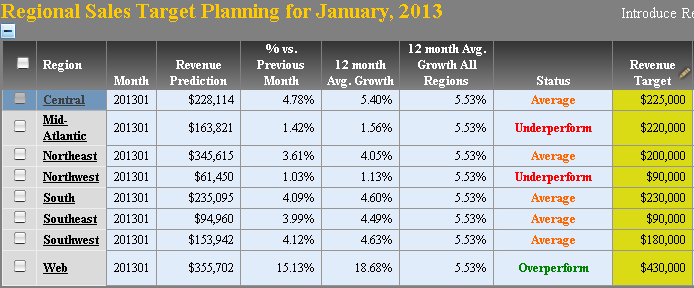
Users often choose to hide columns from grid reports by decreasing the column width to zero. When column's width is set to zero in a Transaction Services Document, and the "Mark rows for selection" is enabled, after expanding the rows for selection, the hidden column reappears. The "Mark rows for selection" option allows the user to choose which values to use to update their data. This option is only available for grids.
STEPS TO REPRODUCE:
1. In Strategy Tutorial Project run (in any mode, besides Express) the "Monthly Regional Sales Targets Planning" document (Strategy Analytics Modules\Strategy Tutorial\Public Objects\Reports\Strategy Platform Capabilities).
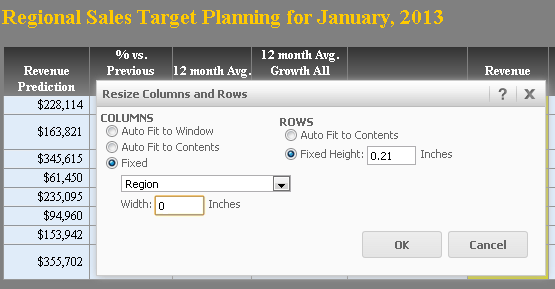
2. Right click the Region column and select "Resize Columns and Rows". In the editor, change the width of the Region attribute to the value of 0, as shown below. It is irrelevant which column is hidden.
3. In Design Mode, right click the grid in the Document and click the "Configure Transaction".
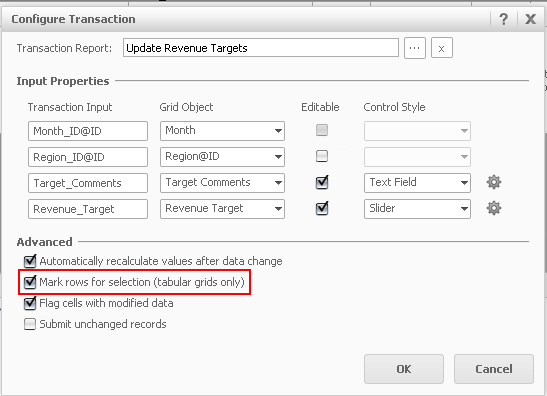
4. Choose the "Mark rows for selection" option.
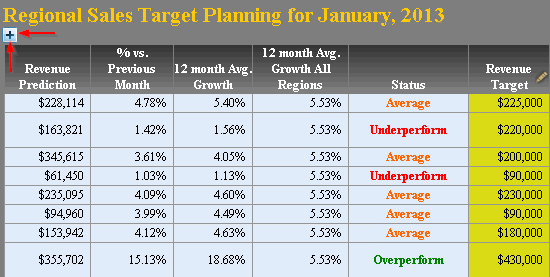
5. Run Report in Express Mode. Click the plus sign on the top of the report.
6. Region column appears on the report, although its width was set to "0".
Video:
You can find a detailed video on how this issue is reproduced here: Tech Note 45385. Steps to reproduce
CAUSE:
This is limitation in Strategy 9.3.1 Web. It has been logged to Technology as a defect for further research.
ACTION:
The issue does not appear in Strategy 9.2.1, 9.3.0 and 9.4.x. If possible, upgrade to the latest release of Strategy. Contact Strategy Technical support for a status of the issue for 9.3.1.
TO LEARN MORE:
For more issues with Transaction Services Documents column width and "Mark Rows for Selection", please see the following Technical Notes:
KB42791
