EducationSoftwareStrategy.com
StrategyCommunity

Knowledge Base

Product

Community

Knowledge Base

TopicsBrowse ArticlesDeveloper Zone

Product

Download SoftwareProduct DocumentationSecurity Hub

Education

Tutorial VideosSolution GalleryEducation courses

Community

GuidelinesGrandmastersEvents
x_social-icon_white.svglinkedin_social-icon_white.svg
Strategy logoCommunity

© Strategy Inc. All Rights Reserved.

LegalTerms of UsePrivacy Policy
  1. Home
  2. Topics

KB45387: "Error loading Configuration... Task getESRIConfig could not be instantiated" error message appears when attempting to execute a report or Report Services document with an ESRI map in MicroStrategy Analytics Enterprise Web 9.4.1. and above.


Community Admin

• Strategy


"Error loading Configuration... Task getESRIConfig could not be instantiated" error message appears when attempting to execute a report or Report Services document with an ESRI map in MicroStrategy Analytics Enterprise Web 9.4.1. and above.

SYMPTOM:
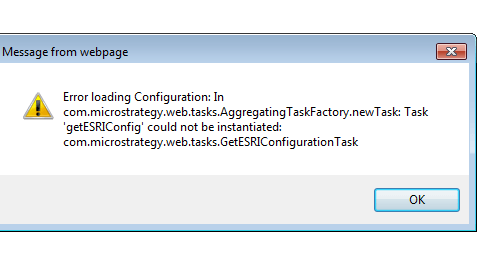
When attempting to execute a report or Report Services document that includes an ESRI map in Strategy Analytics Enterprise Web 9.4.1 - 10.5, a user sees the following error:
ka04W000000OaUqQAK_0EM4400000026RF.png

Sample Code/Error


Error loading Configuration: In com.Strategy.web.tasks.AggregatingTaskFactory.newTask: Task 'getESRIConfig' could not be instantiated: com.Strategy.web.tasks.GetESRIConfigurationTask

CAUSE:
The error is the result of residual ESRIMapConnector plugin files in the Strategy Web 9.4.1 installation directory. The ESRI plugin used for previous versions of Strategy is no longer necessary in 9.4.1. Instead, the ESRI key received from Support should be used, as seen in KB45064: How to activate cloud-based ESRI maps for MicroStrategy Web products.
 
ACTION:
Remove the ESRIMapConnector files from the plugins folder inside the Strategy Web installation directory and restart the web server:
<Strategy Web Home>/plugins/

KB45387


Comment

0 comments

Details

Knowledge Article

Published:

May 26, 2017

Last Updated:

November 16, 2018