SYMPTOM:
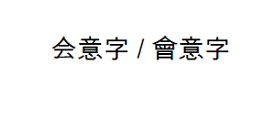
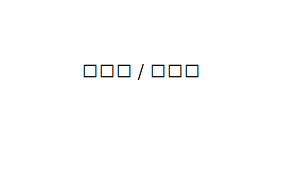
When users try to export a document with Unicode characters (e.g., Japanese, Chinese) to PDF in Strategy Web 9.x, the characters are not displayed correctly. The characters are either missing from the export or are replaced with boxes even though they are displayed correctly when exported to Microsoft Excel.
STEPS TO REPRODUCE:
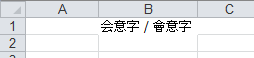
Exporting the same document to Microsoft Excel displays the characters correctly as shown below.
CAUSE:
The font specified for these characters does not support Unicode characters. The user is able to see the fonts displayed correctly in web and is able to export them successfully to Microsoft Excel because they are Unicode compatible.
ACTION: