In Strategy 9.3.x and earlier versions, when there are derived elements defined on the same unit in both base and view templates, the document fails with an error message. In Strategy Analytics Desktop and Strategy Analytics Enterprise 9.4.1, the document can run without error while the derived element in the base template is ignored.
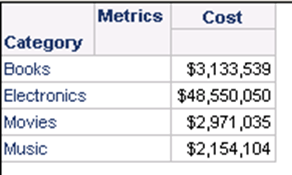
To illustrate this example, create a report with Category and Cost.
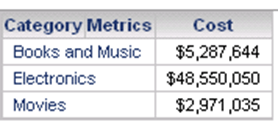
Then create a document base on the report and create derived element “Books and Music” for Category.
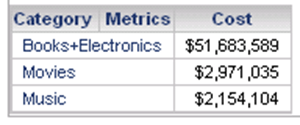
Go back to the report and create derived element as “Books+Electronics” for Category.
Run the document again in 9.3.1, it returns an error message and fails the document:

Error Message
Your request could not be processed. Please try again. If the problem persists, contact the Administrator.
(Report processing could not be completed. The derived element definitions on same unit were found in both base and view templates. Please remove one of those definitions. Internal Error: DSSDocumentDataPreparationTask::Run(): Error evaluate views info, job 6, Error Code=-2147212230.)
In Strategy Analytics Enterprise 9.4.1, the document can run without error while the derived element in the base template is ignored.

Note that if the derived element is defined in the dataset report first, it is not allowed to be a defined derived element in the document grid on the same attribute. This technote is about the case that derived element is defined in the dataset report after the derive element is defined in the document grid.
