EducationSoftwareStrategy.com
StrategyCommunity

Knowledge Base

Product

Community

Knowledge Base

TopicsBrowse ArticlesDeveloper Zone

Product

Download SoftwareProduct DocumentationSecurity Hub

Education

Tutorial VideosSolution GalleryEducation courses

Community

GuidelinesGrandmastersEvents
x_social-icon_white.svglinkedin_social-icon_white.svg
Strategy logoCommunity

© Strategy Inc. All Rights Reserved.

LegalTerms of UsePrivacy Policy
  1. Home
  2. Topics

KB45439: "Apply Selection as Filter" option in a Selector's Property List Pane does not dynamically reflect changes in the Selector Property option in MicroStrategy 9.4.x.


Stefan Zepeda

Salesforce Solutions Architect • Strategy


"Apply Selection as Filter" option in a Selector's Property List Pane does not dynamically reflect changes in the Selector Property option in MicroStrategy 9.4.x.

SYMPTOM:
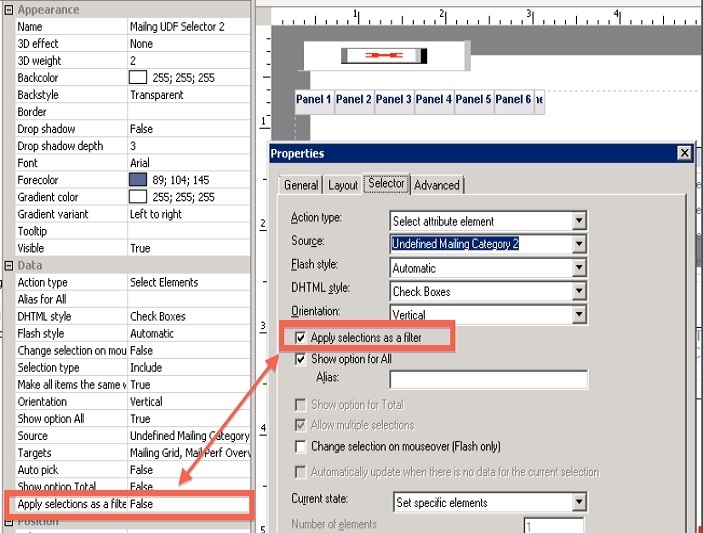
"Apply Selection as Filter" selector option in document does not properly interact dynamically between property list pane view and selector properties option.  This issue is illustrated in the screenshot below.
 

ka02R000000kY3IQAU_0EM440000002CZY.jpeg

 
Notice how the 'Apply selections as a filter' checkbox is selected but it is not reflected in the Property List Pane.  The option that is reflected on the document is the one that is selected in the Properties window.
 
CAUSE:
 
This is a known issue in Strategy Developer 9.4.x.
 
ACTION:
 
Contact Strategy Technical Support for an update on this issue.


Comment

0 comments

Details

Knowledge Article

Published:

June 12, 2017

Last Updated:

June 12, 2017