SUMMARY:
This technical note explains why even the user saved a report with the Report Objects pane opened this is closed if within another report ran after the first one the pane was closed too in Strategy Web 9.x and 10.x. This is an expected behavior controlled by the browser’s cookies and not the report definition within the metadata. There is an Enhancement Request to have a setting or Web Preference so that user can control how Report Objects Window should appear when accessing a report.
SYMPTOM:
In either Strategy Web 9.x or 10.x he user executes a report and saves it with the Report Objects window opened:
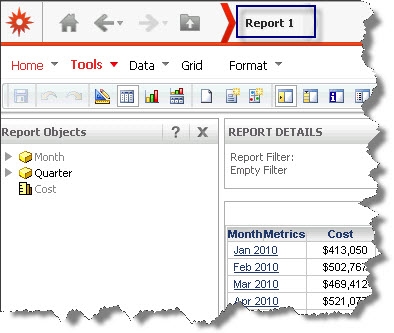
Then user executes and saves another report but closes the Report Objects Window
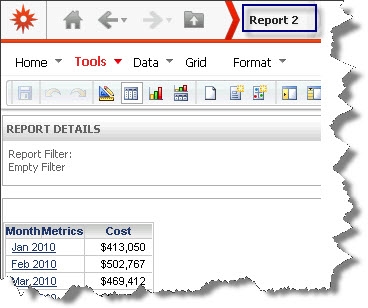
When returning to the first report (Report 1) the pane is closed too
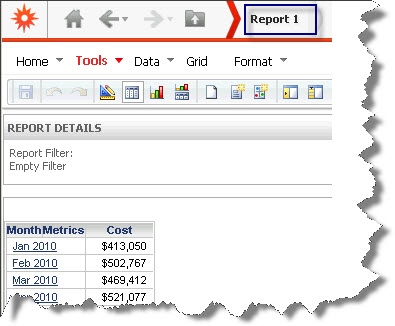
Same behavior happens if the report is saved initially with the pane closed and the second report’s (Report 2) last state had the pane opened, then Report 1 will show the window opened too.
STEPS TO REPRODUCE:
Perform the following steps in either Strategy Web 9.x and 10.x:
Video:
You can find a detailed video on how this issue is reproduced here: Tech Note 45454. Steps to reproduce
CAUSE:
The state of the Report Objects Window is not controlled by the report definition in the metadata but instead by the browser’s cookies. When the Report Objects Windows state is changed it will be saved in the cookies. This is why the Report Objects state will always be maintained as per the last action performed on a report. If the user closes the panel and then eventually clears the cookies from his browser, the panel should be open next time they log in and execute a report.
ACTION:
An enhancement request has been logged to Technology so that a user could control the behavior of the Pane adding a setting to choose between keeping this selection in the cookies and referring to it for all reports, or simply not save it anywhere and by default to be open in all new report executions. Contact Strategy Technical Support for an update on this request.
WORKAROUND:
User could clean browser cookies to force the Report Objects Windows opened. However this workaround takes more time compared to simply manually reopening the panel.
TO LEARN MORE:
Related Technical Notes:
