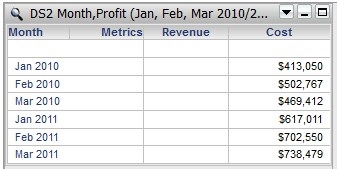
With the release of Strategy Analytics Enterprise 9.4.x and newer releases, users can choose template units (attributes, metrics) from any dataset in a Report Services document in a single grid. To enable this feature, the Analytical Engine will attempt to join the datasets and display the relevant results.
In some circumstances, the Analytical Engine may calculate a null result for an attribute in some rows of the grid after joining the datasets. Any metric values to be calculated by aggregating over those rows will also be displayed as empty or NULL. Users can consider the following example:
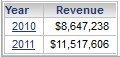
DS1 has the attribute Year and the metric Revenue filtered for 2010 and 2011:
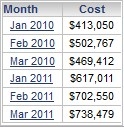
DS2 has the attribute Month and the metric Cost filtered for Jan, February and March of 2010 and 2011:
When these two datasets are added to a grid in a Report Services Document, the following results are observed:
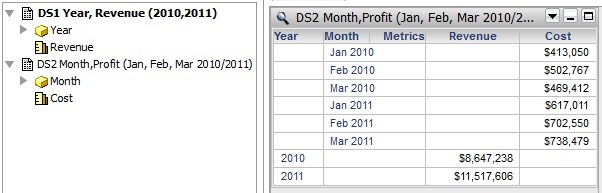
If the attribute 'Month' is removed from the grid, the Cost metric displays a result, as the Analytical Engine can use the schema relationship between 'Year' and 'Month' to aggregate 'Cost' over the months from DS2 and display a value:
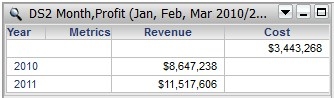
However if the Year attribute is removed from the grid, the Analytical Engine cannot aggregate the 'Revenue' metric over the Years attribute because Year is a parent attribute of Month with a 1:Many relationship, so the row is left blank.