With Strategy Analytics Enterprise, the Analytical Engine logic has the ability to join data from multiple datasets in a Report Services Document. One of the features that is available with this is the ability to use objects (attributes, metrics) from multiple datasets in a single grid in a document. Since multiple datasets may contain the same metric object, this document attempts to explain the logic used by the engine when choosing which dataset to use as the source for the metric data.
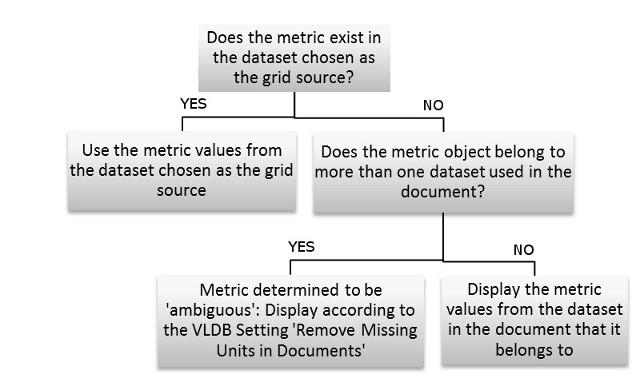
The logic used by the engine is as follows: For a metric on a grid, if the grid source contains the metric object, then the values in the grid will be populated from the grid source dataset. If the metric object does not exist in the grid source dataset, but there is only one dataset used in the document that contains the metric, then the metric values in the grid are populated from its source dataset. This is explained with the help of the flow chart below.
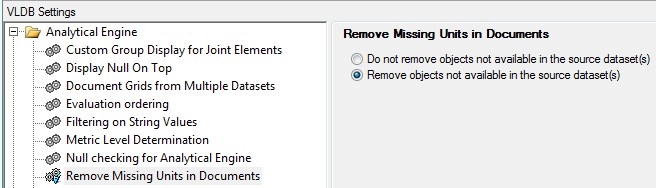
For the case where there are multiple datasets in the document, and the metric in the grid is present in more than one of the datasets, and the metric object is not in the grid source dataset (or the grid source for the grid is set to 'None'), then the metric is treated as ambiguous. The metric object on the dataset is then displayed as determined by the 'Remove Missing Units in Documents' Analytical Engine VLDB setting. A screen shot of this setting is shown below, and the options available are documented in the Strategy Product Manuals: Report Services Document Creation Guide: Working with multiple dataset documents. For the option 'Do not remove objects not available in the source dataset', the metric column will be displayed but no data will be seen.
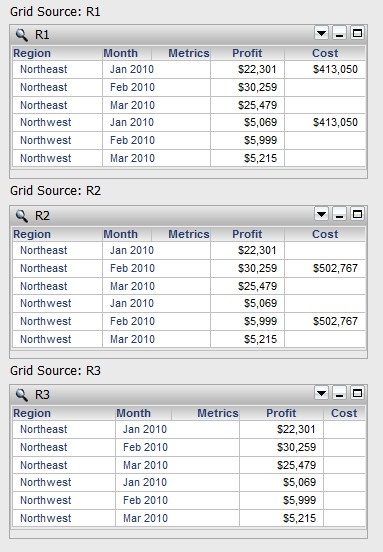
For an example consider the following three datasets in a Report Services Document:
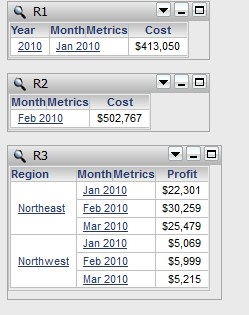
The following example grid has the Cost metric which can be seen to be present in two of the datasets for different grid source settings: