EducationSoftwareStrategy.com
StrategyCommunity

Knowledge Base

Product

Community

Knowledge Base

TopicsBrowse ArticlesDeveloper Zone

Product

Download SoftwareProduct DocumentationSecurity Hub

Education

Tutorial VideosSolution GalleryEducation courses

Community

GuidelinesGrandmastersEvents
x_social-icon_white.svglinkedin_social-icon_white.svg
Strategy logoCommunity

© Strategy Inc. All Rights Reserved.

LegalTerms of UsePrivacy Policy
  1. Home
  2. Topics

KB45481: Attribute forms cannot be displayed in a report services document or Visual Insight Analysis in MicroStrategy Web


Community Admin

• Strategy


Attribute forms cannot be displayed in a report services document or Visual Insight Analysis in MicroStrategy Web 9

SYMPTOM:
 
Attribute forms, if not added to the Report display form, cannot be displayed in a report services document or Visual Insight Analysis in Strategy Web 9.
 
STEPS TO REPRODUCE:

  • Take the attribute "Customer" for instance. Go to the attribute editor and make sure only "First Name" and "Last Name" are available in the Report display forms.
     
ka04W000000OgL5QAK_0EM4400000026RA.png
  • Create an Intelligent Cube with "Customer", and add the attribute form "Email" into the cube.
     
ka04W000000OgL5QAK_0EM4400000026RD.png
  • Create a report based on the Intelligent Cube. Ensure that the email addresses can be displayed properly.
     
ka04W000000OgL5QAK_0EM4400000026R8.png
  • Create a report services document or Visual Insight Analysis.
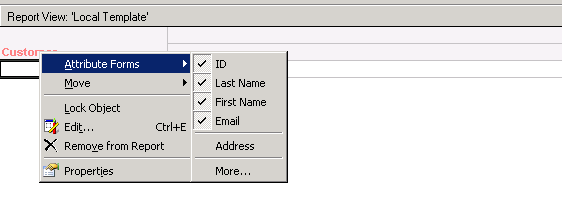
  • Add a grid with the attribute Customer. The "Email" column cannot be found in the grid.
     
ka04W000000OgL5QAK_0EM4400000026RB.png

CAUSE:
 
The problematic attribute form is not in the Report display forms. In the meantime the report services document or Visual Insight Analysis was created from an Intelligent Cube directly.
 
ACTION:
 
Users can choose either of the following ways to solve the problem:

  1. Add the problematic attribute form to the Report display forms at Attribute Editor -> Display. Users need to update the schema after the modification. 
  2. Create a report on the Intelligent Cube. Ensure that the attribute form displays properly in the report. After that, create a report services document or Visual Insight Analysis based on the Intelligent Cube report.


Comment

0 comments

Details

Knowledge Article

Published:

June 15, 2017

Last Updated:

June 15, 2017