EducationSoftwareStrategy.com
StrategyCommunity

Knowledge Base

Product

Community

Knowledge Base

TopicsBrowse ArticlesDeveloper Zone

Product

Download SoftwareProduct DocumentationSecurity Hub

Education

Tutorial VideosSolution GalleryEducation courses

Community

GuidelinesGrandmastersEvents
x_social-icon_white.svglinkedin_social-icon_white.svg
Strategy logoCommunity

© Strategy Inc. All Rights Reserved.

LegalTerms of UsePrivacy Policy
  1. Home
  2. Topics

KB45482: Gantt charts in report services documents show blank on iPad against MicroStrategy Mobile APP 9.4.1


Community Admin

• Strategy


This knowledge base article describes the issues in Gantt chart where it renders data incorrectly in MicroStrategy Web 9.4.1 and renders blank in MicroStrategy Mobile 9.4.1.

SYMPTOM:
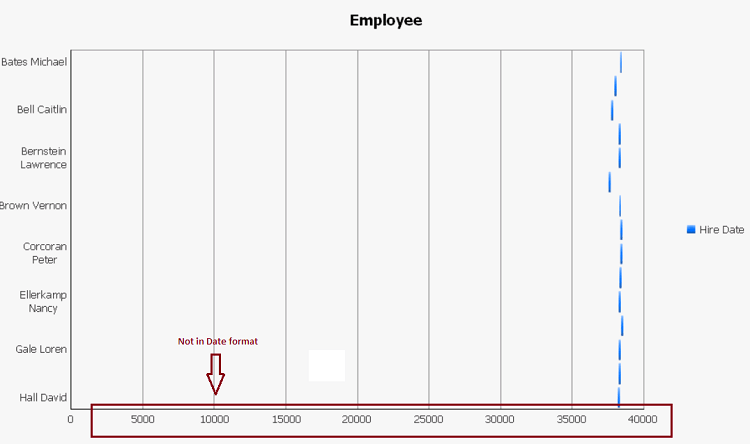
When users run a report services document on iPad against Strategy Mobile Client 9.4.1, the embedded Gantt chart shows blank. The same Gantt chart renders data in Strategy Web 9.4.1 but with incorrect format.
 
STEPS TO REPRODUCE:
  • Create two metrics based on an existing attribute, for instance:
    Hire Date: Max() {~}
    Hiring Time: MonthsBetween(CurrentDateTime(), )
  • Create a report with one attribute "Employee" and two metrics "Hire Date" and "Hiring Time".
  • Create a report services document based on the report.
  • Add a Gantt chart to the report services document.
  • Confirm that the format of "Hiring Date" is Date.
  • Run the report services document in Web. The metric Hiring Date in the x axis returns in the number format (such as 35000), not in the pre-defined Date format.
       
ka04W000000Oaa0QAC_0EM440000002AAk.png
  • Run the report services document on iPad against Strategy Mobile APP 9.4.1. The Gantt chart renders blank.
      
ka04W000000Oaa0QAC_0EM440000002AAJ.png

 
CAUSE:
These are known issues in Strategy Web 9.4.1 and Strategy Mobile Client 9.4.1.
 
ACTION:
This issue is fix confirmed as of Strategy Mobile 9.4.1 update 2. Upgrade to the latest version of the Strategy mobile app to take advantage of the fix. 
KB09679


Comment

0 comments

Details

Knowledge Article

Published:

April 3, 2017

Last Updated:

September 25, 2018