EducationSoftwareStrategy.com
StrategyCommunity

Knowledge Base

Product

Community

Knowledge Base

TopicsBrowse ArticlesDeveloper Zone

Product

Download SoftwareProduct DocumentationSecurity Hub

Education

Tutorial VideosSolution GalleryEducation courses

Community

GuidelinesGrandmastersEvents
x_social-icon_white.svglinkedin_social-icon_white.svg
Strategy logoCommunity

© Strategy Inc. All Rights Reserved.

LegalTerms of UsePrivacy Policy
  1. Home
  2. Topics

KB45539: How to do a project duplication with user delivery subscriptions for a MicroStrategy Cloud Enterprise Environment


Stefan Zepeda

Salesforce Solutions Architect • Strategy


How to do a project duplication with user delivery subscriptions for a MicroStrategy Cloud Enterprise Environment

 
To duplicate a project with subscriptions, follow the steps provided in "KB45537 How to duplicate a project without subscriptions for Strategy Cloud Enterprise" adjusting the following steps:
 
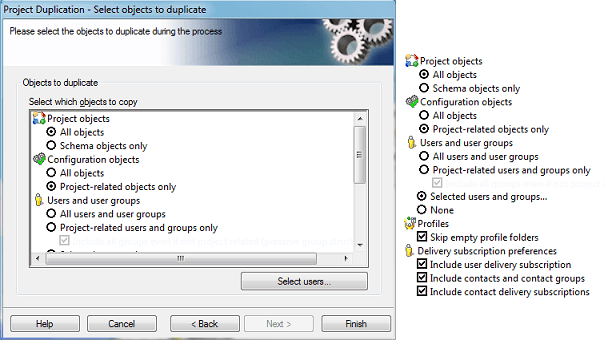
Step 8: Change the migrating objects to the following:
 

ka02R000000kb8tQAA_0EM440000002CY2.png

 
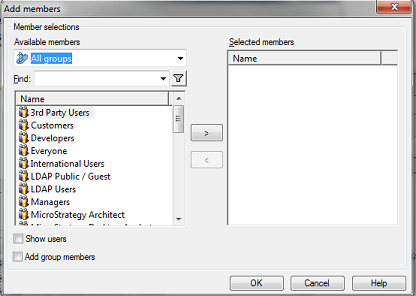
Click on "Select users.." and select all users and groups, except for "proj_admin" and "administrator" since this are system users.
 

ka02R000000kb8tQAA_0EM440000002CYF.png

 
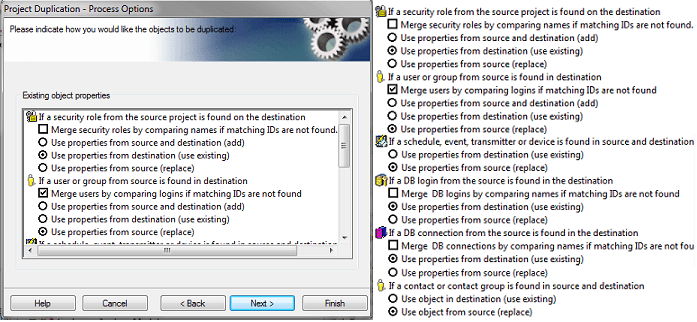
Click "OK" and then Next to select the next set of objects:
 

ka02R000000kb8tQAA_0EM440000002CYE.png

 
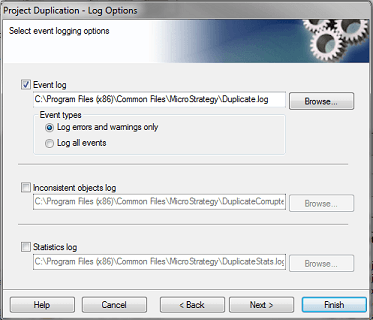
Once this is done click "Next" and in the Log destinations screen, uncheck "Inconsistent objects log" and "Statistics log"
 

ka02R000000kb8tQAA_0EM440000002CYC.png

 
Click "Finish" and wait for the process to conclude.
Once this is finished, open a case with Strategy Technical support, requesting the following:
- Cache and Intelligent Cubes storage setting
- Review the ACL's
- Restart the destination Intelligence Server for the changes to take effect.
 
414290


Comment

0 comments

Details

Knowledge Article

Published:

April 11, 2017

Last Updated:

April 25, 2018