EducationSoftwareStrategy.com
StrategyCommunity

Knowledge Base

Product

Community

Knowledge Base

TopicsBrowse ArticlesDeveloper Zone

Product

Download SoftwareProduct DocumentationSecurity Hub

Education

Tutorial VideosSolution GalleryEducation courses

Community

GuidelinesGrandmastersEvents
x_social-icon_white.svglinkedin_social-icon_white.svg
Strategy logoCommunity

© Strategy Inc. All Rights Reserved.

LegalTerms of UsePrivacy Policy
  1. Home
  2. Topics

KB45541: A Budget graph with Horizontal lipstick will not display the data label of a bar close to the edge of the graph containers in MicroStrategy Mobile Client 9.4.1 for iOS


Community Admin

• Strategy


When using a Budget Graph with Horizontal Lipstick, if the largest bar is close to the edge of graph container, it's data label will not appear in MicroStrategy Mobile Client 9.4.1 for iOS

SYMPTOM:
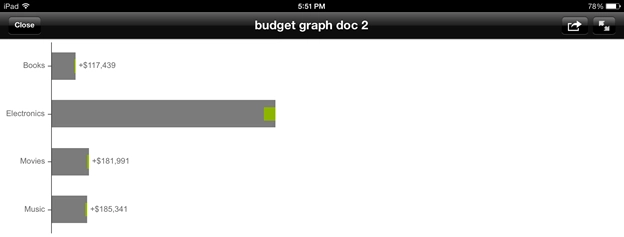
When using a Budget Graph with Horizontal Lipstick, if the largest bar is close to the edge of graph container, it's data label will not appear, in Strategy Mobile Client 9.4.1 for iOS, like shown below.
 

ka04W000001MKnrQAG_0EM440000002A9u.png


STEPS TO REPRODUCE
Follow these steps to reproduce in a Strategy Tutorial project.
  • Create a dataset with the Month and Category attributes and the Revenue and Revenue Target metrics.
  • Create a new document with the iPad landscape template and add in the dataset from Step 1.
  • Insert a budgeting graph and size it to fill only a portion of the template.
  • Add Category in the attribute drop zone and Revenue and Revenue Target in the metric drop zone.
  • Run the graph in Editable Mode then right click the graph and navigate to Format.
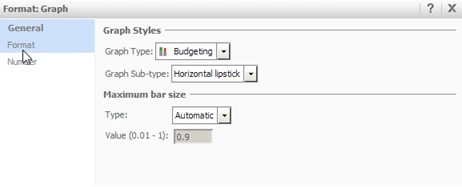
  • Under the General tab, change the graph sub-type to Horizontal Lipstick, like shown below.
ka04W000001MKnrQAG_0EM440000002A9w.png
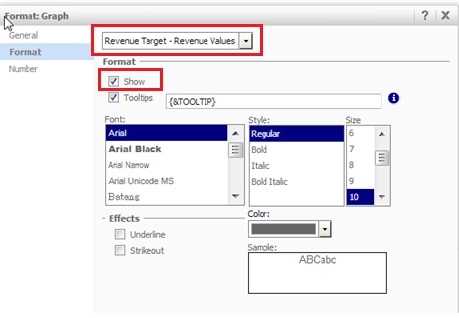
  • Under the Format tab, use the drop down box to go to "Revenue Target - Revenue Values" and check the "Show" box, like shown below.
ka04W000001MKnrQAG_0EM440000002A9x.jpeg
  • Run this graph on an iPad and notice that the highest data label value is not displayed.

 
CAUSE:
This is a known issue with Strategy Mobile Client 9.4.1 for iOS, where if the largest bar is too close to the graph container's edge, in relation to the other bars, it will not have enough space to draw the data label.
 
ACTION:
This issue is fixed in Strategy Mobile Client 9.4.1 Update 3 for iOS. 
 
WORKAROUND:
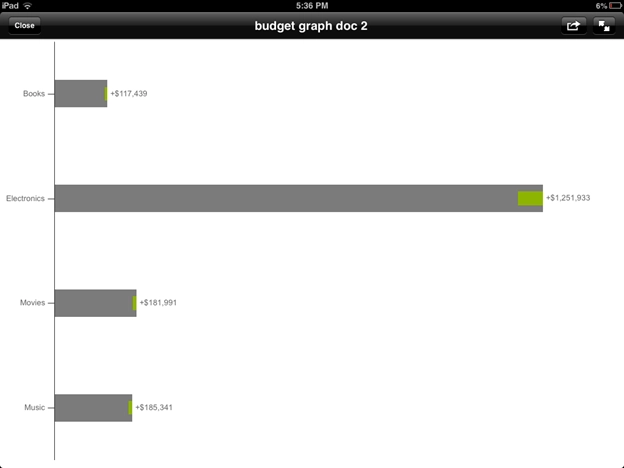
Make the budget graph container large enough to fit the data label, as seen below.
 

ka04W000001MKnrQAG_0EM440000002A9v.png


Comment

0 comments

Details

Knowledge Article

Published:

April 7, 2017

Last Updated:

April 7, 2017