SUMMARY
This technical note describes a limitation when trying to uncheck the 'Remove related report filter elements' condition advanced option in the metric editor and it's limited to Strategy Developer 9.2.x. No workaround is available although a solution/code fix of a new feature has been implemented and is available in Strategy Command Manager 9.3.x and higher versions.
SYMPTOM
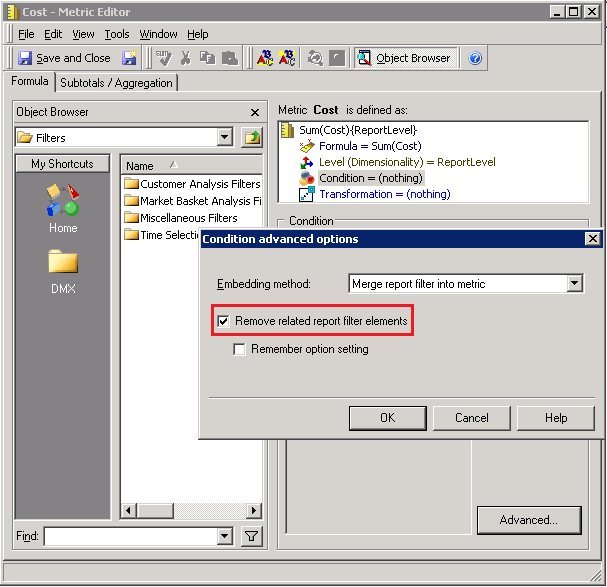
In the metric editor, under Condition > Advanced... > Condition advanced options it is not possible to uncheck the 'Remove related report filter elements' option in bulk for all the metrics in a given project in Strategy Developer 9.2.x as in the screen shot below:
CAUSE
This is working by design and currently the only way of unchecking the 'Remove related report filter elements' option in Strategy Developer 9.2.x is by doing it manually, metric by metric.
ACTION
An enhancement has been implemented in Strategy 9.3.x. Upgrade to this version to take advantage of the new feature.
In Strategy Command Manager 9.3.x the parameter "REMOVEREPORTFILTERELEMENTS" has been implemented to allow unchecking the metric option 'Remove related report filter elements' in bulk. Follow the steps below in order to create a script that will automate this task:
1. In Strategy Command Manager 9.3.x go to menu Edit > Insert / Search Objects > Outlines > Metrics_Outlines.
2. Insert the Alter_Metric_Outline outline and edit as necessary so it looks like the script sample below:

ALTER METRIC "Cost" IN FOLDER "\Public Objects\Metrics\Sales Metrics" REMOVEREPORTFILTERELEMENTS FALSE FOR PROJECT "Strategy Tutorial";
