SUMMARY:
This issue is classified as a usage question. Though the behavior may be misleading, it is actually by design. The impact is limited to Strategy Web 9.3.x where this option is available. A resolution is provided to clarify the expected usage.
SYMPTOM:
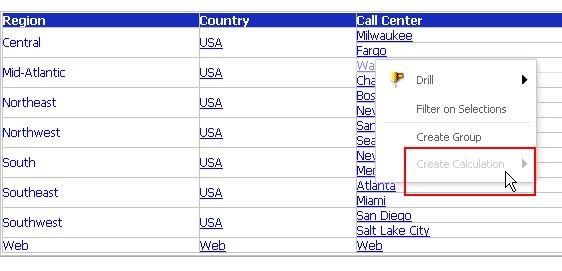
"Create Calculation" option is found unavailable when a Web user right mouse click on an attribute element while "Create Group" and other options are available. Less number of options may be available depending on the security setting on the report or the user. In this example, Administrator user with full privileges is used.
CAUSE:
This is working as designed. To take advantage of this option, multiple elements need to be selected. This option is not available when only one attribute element is selected.
ACTION:
Press "Ctrl" key and select multiple attribute elements, then, display context menu.
VIDEO LINK:
You can find a detailed video on how this issue is reproduced and how the action steps are implemented here: Tech Note 45564. Steps to reproduce and Action Steps
ADDITIONAL TROUBLESHOOTING:
If the issue persists even after selecting multiple elements, collect
TO LEARN MORE:
KB41161: In MicroStrategy 9.3.x and newer, derived elements defined in OLAP reports will be calculated twice
KB30506: Derived elements that are local to the grid are seen in the final result set of a document executed in flash mode in MicroStrategy Web 9
Product Manual > OLAP Services Guide > 4. Derived Elements
