This issue is classified as a conflict with 3rd party tool. The impact is limited to Strategy Web when a widget is displayed in Flash mode. A resolution is provided to address this error.
SYMPTOM:
When trying to view a Heatmap widget in Flash mode, which displayed without any issue in Interactive Mode, following error appears:
Dashboard Startup
The bootstrap sequence has failed. See the Error Log for details.

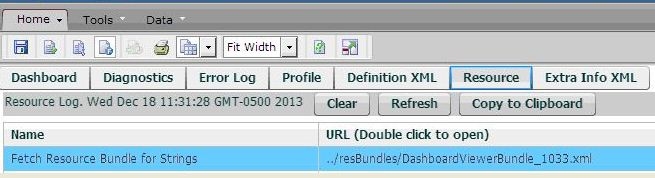
By enabling Flash Debugger, the following error can be seen:
Fetch Resource Bundle for String failed: Error #2032
Please check if the URL is correct and check Strategy Web Error Log.

Name
Fetch Resource Bundle for Strings
URL (Double click to open)
../resBundles/DashboardViewerBundle_1033.xml
CAUSE:
In this particular case, file with .xml extension was set to be hidden by a 3rd party tool called URLScan.
ACTION:
Remove .xml from the list of prohibited extension.
TO LEARN MORE:
External link: http://www.iis.net/downloads/microsoft/urlscan
For similar error message and other troubleshooting methods are discussed in following tech notes:
KB17270: How to enable the Flash debugger and access the error logs when a 'Bootstrap Sequence Failed' error occurs in Flash mode in MicroStrategy Web 8.1.x and 9.0.x.
KB34325: Explanation of different scenarios which affect the Flash debugger sandbox message when viewing a Flash dashboard in MicroStrategy Web 9.0.1:
KB41603: How to enable Flash Profiler in MicroStrategy Web 9.3.x
NOTE:
As seen in KB257502: New in MicroStrategy 10.1 - Interactive and Flash document view modes deprecated; Flash view mode is being deprecated, and it's recommended to use Presentation Mode for new development.
KB 000002834
