SUMMARY
This technical note explains a scenario where a user finds a table within the Schema Objects but it doesn’t show up in the Project Warehouse Catalog. It also describes the cause and how to solve the issue.
SYMPTOM
There is a table listed within Schema Objects folder in Developer but the same table doesn’t show up in the Warehouse Catalog


CAUSE
In Strategy there is a separate object from the Logical Table (object shown in Schema Objects>Tables) which corresponds to the table listed in the Warehouse Catalog. This object is a System Object and its type is ‘Warehouse Table’. Every table added into a Strategy project has a Warehouse Table and a corresponding Logical Table created for it. This table corresponds to the ‘Physical View’ within the table Editor, whereas the Logical View corresponds to the Logical Tables under Schema Objects>Tables.
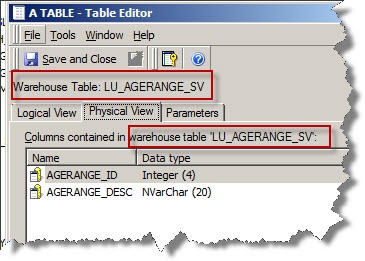
This issue manifests because there is a Warehouse Table object located in the incorrect folder (the table became a managed table; please refer to KB34274 for further details). The correct folder location is the System Objects> Warehouse Tables which should be a hidden system managed location invisible to the final user.
If the administrator shows hidden objects in Developer and looks for the table within ‘System Objects> Warehouse Tables’ the table won’t be listed there:

ACTION STEPS
Run ScanMD to resolve the issue. ScanMD is able to identify the issue and move the Warehouse table back to the correct folder location. Specifically, it moves the problematic Warehouse table to the folder in which that object type (Warehouse table) are supposed to only exist at. It is important to note that this issue has nothing to do with the Schema Objects>Tables folder as those are a different type of table objects.
Note: Please make sure to review the considerations and guidelines for ScanMD found in technote KB35809 before continuing further.
ScanMD will detect the following error:
Incorrect DB Table Location: Error > is not found. A total of 1 object(s) need it..." error message appears when migrating a table object in Strategy Object Manager 9.0.0 and 9.0.1
414285
