EducationSoftwareStrategy.com
StrategyCommunity

Knowledge Base

Product

Community

Knowledge Base

TopicsBrowse ArticlesDeveloper Zone

Product

Download SoftwareProduct DocumentationSecurity Hub

Education

Tutorial VideosSolution GalleryEducation courses

Community

GuidelinesGrandmastersEvents
x_social-icon_white.svglinkedin_social-icon_white.svg
Strategy logoCommunity

© Strategy Inc. All Rights Reserved.

LegalTerms of UsePrivacy Policy
  1. Home
  2. Topics

KB45569: Security filter application in documents using Intelligent Cubes as datasets in MicroStrategy Analytics Enterprise


Stefan Zepeda

Salesforce Solutions Architect • Strategy


This article describes how security filters are applied to documents using Intelligent Cubes in MicroStrategy

Introduction
In Strategy, if a user's security filter is based on an attribute which is not the cube template, but is related to an attribute on the cube, the view report will not return any data. This behavior is described in the following Strategy Knowledge Base document:
KB30711: Security filter application to view reports based on Intelligent Cubes missing the security filter attribute in Strategy OLAP Services
 
Security filter application in Strategy Analytics Enterprise
In Strategy Analytics Enterprise, it is possible to create a report services document with multiple Intelligent Cubes as datasets or add an Intelligent Cube as a dataset along with other regular reports or view reports.
Also, it is possible to create grid objects on dashboards/documents with objects coming from multiple datasets. This feature is described in the following Strategy Knowledge Base document:
KB44944: Multiple datasets in a single grid/graph/widget object in Strategy Web
 
With this, it is possible that the attribute being used in the security filter is part of one of the datasets, but is not directly placed on the grid. Information provided in this document will help users understand how security filters are applied in such a case.
 
In Strategy Analytics Enterprise, the engine will not only consider the source dataset of the grid, but also the other datasets when applying the security filter. Multiple cases are described below to explain the behavior.
 
Important Note: Every view template i.e., grid, is decomposed by the Strategy analytical engine into sub-views, V1 (with metric M1 from source cube IC1),.....Vi (with metric Mi from source cube ICi).... Vn (with metric Mn from source cube Cn). The objects in the source cubes will control how the security filter will be applied.
 
Case A: Security Filter attribute is related to attributes placed on the grid.
Consider the following example based on the Strategy Tutorial project.
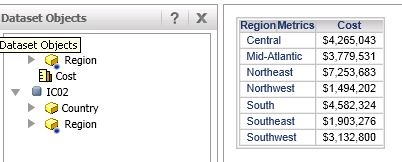

  • Intelligent Cube IC1 contains attribute 'Region' and metric 'Cost'.
  • Intelligent Cube IC2 contains attributes 'Country' and 'Region'
  • Create a report services document with the above 2 Intelligent Cubes as datasets. Add a grid to the document with the objects 'Region' and 'Cost'
  • The user running the document has a security filter defined as 'Country = USA'
  • In this case, the security filter is applied for the user by using the data obtained from IC2. The cube subsetting instruction corresponding to the dataset is as shown below.
     

    Sample Code/Error

    select region@id,
     region@desc
                  
    from C01 left outer join C02 on Region
    where country@id=1


ka02R000000kcWeQAI_0EM440000002CYM.jpeg
  • In the above case, the security filter attribute (Country) is related to the attribute  on the grid (Region) and a data relationship also exists between the attributes 'Country' and 'Region' through the dataset IC2. Therefore, it is possible to apply the security filter here. In case where Intelligent Cube IC2 did not have this relationship data, the security filter cannot be applied and the whole grid data will be blank.
     
ka02R000000kcWeQAI_0EM440000002CYS.jpeg


Case B: Security filter attribute is related to a metric i.e., related to fact entry level of a metric and unrelated to attributes on the grid
Consider the following example based on the Strategy Tutorial project.  
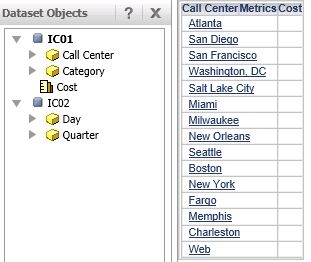
  • Intelligent Cube IC1 contains attributes 'Call Center', 'Category' and metric 'Cost'  
  • Intelligent Cube IC2 contains attributes 'Quarter' and 'Day'
  • Create a report services document with the above 2 Intelligent Cubes as datasets. Add a grid to the document with the objects 'Call Center', 'Cost'
  • The user running the document has a security filter defined as 'Quarter = 2005 Q1'
  • In this case, no data is displayed for the 'Cost' metric. The reason for this behavior is that, the analytical engine decomposes the grid template into sub views as explained in the note at the beginning of this document. For the above example, the view template gets sourced to the Intelligent Cube IC1 and this does NOT have the attribute 'Quarter' (the filtering attribute) and entry level of the metric (Day) is related to the security filter attribute. Since the filter cannot be applied, the metric is not shown to the user.
     
ka02R000000kcWeQAI_0EM440000002CYO.jpeg

Case C: Security filter is unrelated
In cases where the security filter attribute is not related to the fact entry level of the metric or to any attributes on the grid, the security filter will be ignored and the metrics will be displayed to the user. Even in cases, where the grid only contains attributes and the attributes are unrelated to the security filter attributes, the security filter is ignored.


Comment

0 comments

Details

Knowledge Article

Published:

April 14, 2017

Last Updated:

April 14, 2017