EducationSoftwareStrategy.com
StrategyCommunity

Knowledge Base

Product

Community

Knowledge Base

TopicsBrowse ArticlesDeveloper Zone

Product

Download SoftwareProduct DocumentationSecurity Hub

Education

Tutorial VideosSolution GalleryEducation courses

Community

GuidelinesGrandmastersEvents
x_social-icon_white.svglinkedin_social-icon_white.svg
Strategy logoCommunity

© Strategy Inc. All Rights Reserved.

LegalTerms of UsePrivacy Policy
  1. Home
  2. Topics

KB45573: In MicroStrategy Analytics Enterprise the behavior may be inconsistent when running a document based on an extended data access (XDA) report in a different locale.


Community Admin

• Strategy


This article describes a scenario where odd data may be seen with data blending

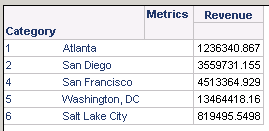
It is generally not a problem when running an extended data access (XDA) report alone. The problem will be encountered using the Cube Join feature supported in Strategy Analytics Enterprise; XDA reports do not support Data Internationalization. Take a FreeForm SQL Report as an example. Users can write SQL to select any column in any language, so this has the potential to have different forms for the same attribute ID. Take the following example:
 
Create a normal report and a FreeForm SQL report:
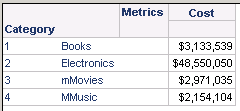
  • English Locale:
ka04W000000ObcbQAC_0EM440000002CYj.png
  • French Locale:
  • Freeform SQL report (select a different column for Category):
ka04W000000ObcbQAC_0EM440000002CYl.png

Create a document based on those reports in English locale.
The grid is Category, Cost and the grid source is the normal report. The report's results are shown below:
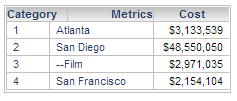
ka04W000000ObcbQAC_0EM440000002CYh.png

The form of Category uses the Freeform SQL report's Category except one form which only exists in the normal report.  So the Analytical Engine will store the attributes information as follows:
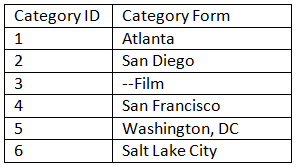
 

ka04W000000ObcbQAC_0EM440000002CYf.png

 
This behavior is decided by the following rule. If one dataset has an incomplete attribute form or has a different attribute form from the other dataset:

  1. If there is a null value form, it will use the non-null value form instead of null.
  2. If two datasets have different attribute form, it will use the form with the biggest dataset.
  3. If the two datasets have the same number of rows, it will use the first dataset added into the document.


Comment

0 comments

Details

Knowledge Article

Published:

May 23, 2017

Last Updated:

May 23, 2017