EducationSoftwareStrategy.com
StrategyCommunity

Knowledge Base

Product

Community

Knowledge Base

TopicsBrowse ArticlesDeveloper Zone

Product

Download SoftwareProduct DocumentationSecurity Hub

Education

Tutorial VideosSolution GalleryEducation courses

Community

GuidelinesGrandmastersEvents
x_social-icon_white.svglinkedin_social-icon_white.svg
Strategy logoCommunity

© Strategy Inc. All Rights Reserved.

LegalTerms of UsePrivacy Policy
  1. Home
  2. Topics

KB45575: Dynamic metric aliasing does not work in a RS Document in MicroStrategy Web 9.3.1 and 9.4.0.


Community Admin

• Strategy


Dynamic metric aliasing does not work in a RS Document in MicroStrategy Web

SYMPTOM:
Starting from Strategy Web 9.3.0, users can configure a report to allow prompt answer to be added to the name of a metric, thus dynamically aliasing the metric; this behavior is explained in technical note KB40091. However, when a report configured like this is used  in a report services document, the functionality does not work, in Strategy Web 9.3.1 and 9.4.0.
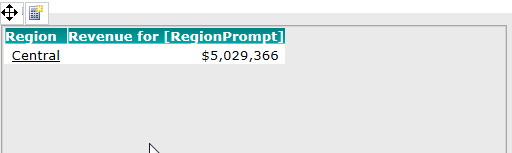
Instead of showing the prompt answer, such as Central, in the metric alias, the prompt name "RegionPrompt" is displayed as shown below:
ka04W000001MKqpQAG_0EM4400000026Qd.png

A similar issue is also explained in technical note KB41763, which shows this can be solved by saving and re-running the report. However, in a document this approach does not work; the prompt name is still shown instead of the value. 
 
STEPS TO REPRODUCE:
Follow these steps to reproduce in a Strategy Tutorial project.
  • Create a report with the Region attribute and the Revenue metric.
  • Create a Region prompt and name it "RegionPrompt".
  • Save the report and add it to a document template as a dataset.
  • Run the document in the Editable mode.
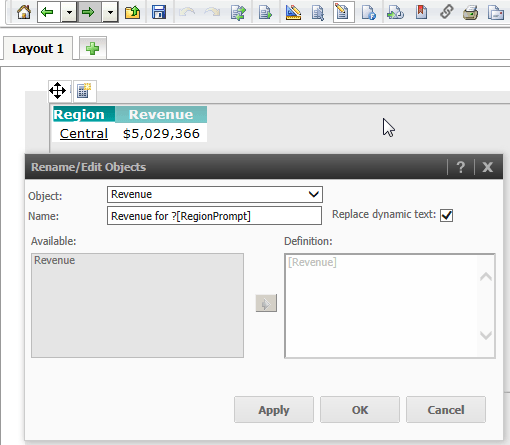
  • Right mouse click on Revenue and, in the menu, select "Rename/Edit.."
  • Enable "Replace dynamic text".
  • Change the name of the metric to include the name of the prompt created in step 2, as shown in the image below:
ka04W000001MKqpQAG_0EM4400000026Qf.png
  • Sample Code/Error
    Revenue for ?
     

  • Click "Apply".
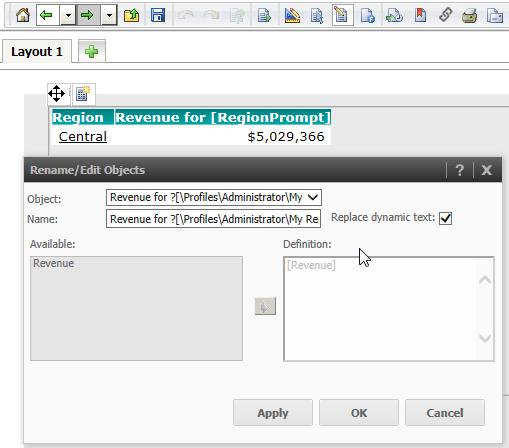
    The will be replaced with the prompt location path:
ka04W000001MKqpQAG_0EM4400000026Qg.png
  • Click OK.
    still appears in the metric alias instead of the actual prompt answer.
ka04W000001MKqpQAG_0EM4400000026Qj.png

  
CAUSE:
This is a known limitation in Strategy Web 9.3.1 and 9.4.0. The feature of metric aliasing explained in tech note TN40091 was only intended for reports and not for documents. An enhancement request has been logged to address this issue.
 
ACTION:
Contact Strategy Technical Support for an update on this issue.
 
WORKAROUND:
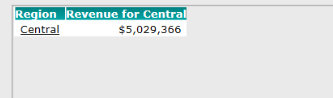
Instead of creating  dynamic metric alias in a document, create it in a report then add the report to a document as a shortcut.
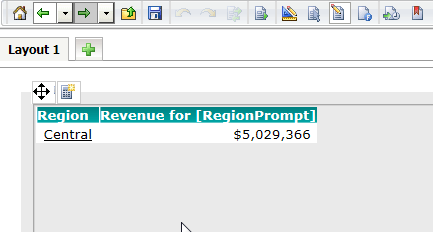
As shown below, the dynamic metric alias displays the prompt answer:
 

ka04W000001MKqpQAG_0EM4400000026Qe.png


Comment

0 comments

Details

Knowledge Article

Published:

April 6, 2017

Last Updated:

April 6, 2017