EducationSoftwareStrategy.com
StrategyCommunity

Knowledge Base

Product

Community

Knowledge Base

TopicsBrowse ArticlesDeveloper Zone

Product

Download SoftwareProduct DocumentationSecurity Hub

Education

Tutorial VideosSolution GalleryEducation courses

Community

GuidelinesGrandmastersEvents
x_social-icon_white.svglinkedin_social-icon_white.svg
Strategy logoCommunity

© Strategy Inc. All Rights Reserved.

LegalTerms of UsePrivacy Policy
  1. Home
  2. Topics

KB45604: Logging in to select a root folder times out when connecting to a MicroStrategy Intelligence Server cluster in MicroStrategy Mobile


Community Admin

• Strategy


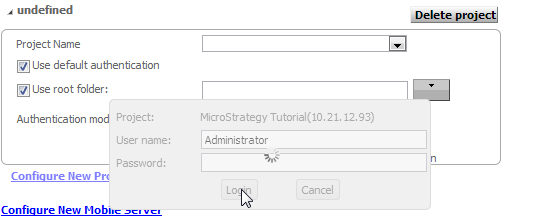
While creating a new mobile configuration in the MicroStrategy Mobile Admin page with a MicroStrategy Intelligence Server cluster environment, the user will be able to log in to a project successfully on the Connectivity Settings page, but will be unable to choose a root folder. After entering the correct credentials in the "Use root folder" dialog box, the dialog box hangs, preventing the user from proceeding any further, like shown below.
SYMPTOM:
While creating a new mobile configuration in the Strategy Mobile 9.x and 10.x Admin page with a Strategy Intelligence Server cluster environment, the user will be able to log in to a project successfully on the Connectivity Settings page, but will be unable to choose a root folder. After entering the correct credentials in the "Use root folder" dialog box, the dialog box hangs, preventing the user from proceeding any further, like shown below.

ka04W00000148aXQAQ_0EM440000002A9o.png

 
The same issue is also seen in the Home Screen tab of the Mobile Configuration when using the "Display the contents of a folder" feature.
When the user goes to Diagnostics > View logs in Strategy Mobile 9.3.0 server, the following error is seen:

 

ka04W00000148aXQAQ_0EM440000002A9m.png

Sample Code/Error:


Class: CDSSXML ClusterNode

Method: CreateConnection

Message: The connection failed. Possible causes are a) Server is not running, b) Server is loading project, c) Network problem, or d) Server reached maximum connection limit. (com.Strategy.webapi.MSTRWebAPIException)

Furthermore, if the user looks at the Strategy Mobile Admin page > Intelligence Servers > Servers > Connected servers, they will notice that one of the IServer nodes appears offline. Attempting to connect that individual IServer node to the Strategy Mobile server, will cause the same error shown above.
CAUSE:
A possible cause is that if the user is utilizing "HTTPS" in the communication between the mobile server and the Strategy Intelligence Server, the broken cluster nodes does not have the port configured with the correct HTTPS permissions.
ACTION:
Contact your network team for assistance to ensure that all HTTPS ports are configured correctly on all nodes of the Strategy Intelligence server cluster and are accessible to the Strategy Mobile 9.x or 10.x server.


Comment

0 comments

Details

Knowledge Article

Published:

April 13, 2017

Last Updated:

April 13, 2017