EducationSoftwareStrategy.com
StrategyCommunity

Knowledge Base

Product

Community

Knowledge Base

TopicsBrowse ArticlesDeveloper Zone

Product

Download SoftwareProduct DocumentationSecurity Hub

Education

Tutorial VideosSolution GalleryEducation courses

Community

GuidelinesGrandmastersEvents
x_social-icon_white.svglinkedin_social-icon_white.svg
Strategy logoCommunity

© Strategy Inc. All Rights Reserved.

LegalTerms of UsePrivacy Policy
  1. Home
  2. Topics

KB45606: The date format for English (Canada), dd/mm/yyyy, is shown as the US date format, mm/dd/yy, in MicroStrategy Web


Community Admin

• Strategy


The date format for English (Canada), dd/mm/yyyy, is shown as the US date format, mm/dd/yy, in MicroStrategy Web.

SYMPTOM:
In Strategy Web 9.4.1, when the 'Number and Date format' in the Web Preferences is set to ‘Default’, like shown below, the number and date format should pick up from the client machine OS level Region and Language settings:

ka04W00000148sHQAQ_0EM4400000026Pa.jpeg

 
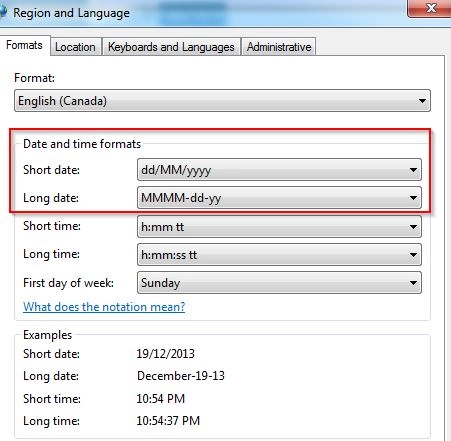
For instance, if a user changes their client machine's Windows 'Regional and Language' Date and time formats to a language other than English (U.S.), such as Polish (Poland), Strategy Web will automatically use the date format from the new selection. However, when a language such as English (Canada) is selected, like shown below:
 

ka04W00000148sHQAQ_0EM4400000026PW.jpeg

 
The date format in Strategy Web 9.3.1 will not display the desired ‘dd/MM/yyyy’ format, but will revert back to the default mm/dd/yy.
 
STEPS TO REPRODUCE:
Follow these steps to reproduce the issue in a Strategy Tutorial Project:

  • Log in to Strategy Web 9.4.1 from a Windows machine.
  • Go to the Web Preferences page.
  • Select the Project Defaults option.
  • Under the Language section, select the ‘Default’ option for 'Number and Date format'.
  • Save the changes and log out of Strategy Web 9.4.1.
  • On the same Windows machine, go to Control Panel.
  • Select Region and Language.
  • Under the Formats tab, select English (Canada ) from the Format drop down list.
    Notice that the date format is different from English (U.S.)

    Sample Code/Error

    
    dd/MM/yyyy


  • Save the changes.
  • Launch Strategy Web and log in.
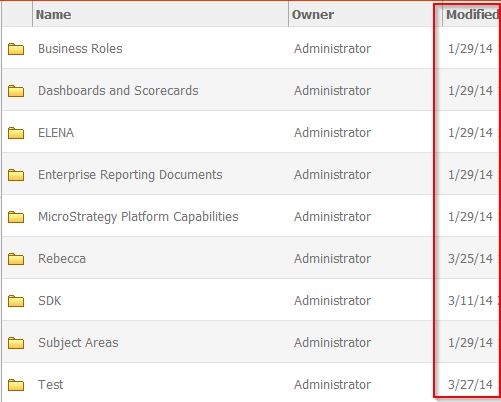
  • Browse to a folder to see the ‘Modified’ column, next to each item, is displayed as mm/dd/yy as shown below, instead of the expected dd/MM/yyyy.
ka04W00000148sHQAQ_0EM4400000026PC.jpeg
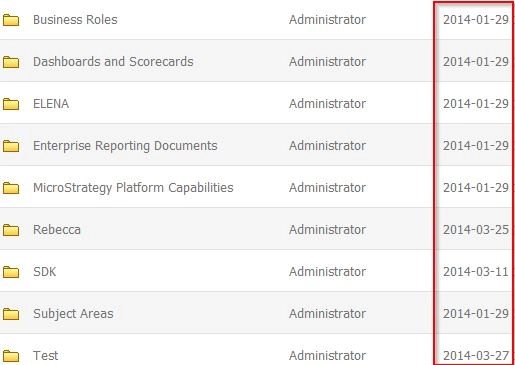
  • Repeat step 6 – 11 but select Polish instead of English (Canada). Notice how the Polish (Poland) date format yyyy-mm-dd is displayed correctly on Strategy Web 9.3.1 as shown below.
ka04W00000148sHQAQ_0EM4400000026PO.jpeg

 
CAUSE:
This is a limitation in Strategy Web 9.4.1 and above. When the 'Number and Date format' in the Web Preferences is set to ‘Default’ the number and date format should pick up from the client machine OS level Region and Language settings. However the locale selected must exist in the ‘format_config.xml’ file of the Strategy Web 9.3.1 server located at:
Sample Code/Error


<Strategy Home>WEB-INF\xml\format_config.xml
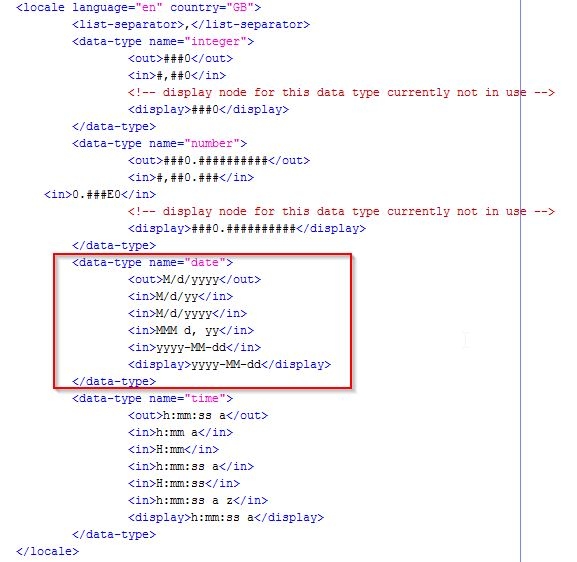
 
When the locale selected does not exist in this file, Strategy Web will use the default English (U.S.) format instead. The Polish (Poland) format was properly displayed because the Polish locale already exists in this file, but the English (Canada) locale does not.
 
ACTION:
Manually add the desired locale to Strategy Web 9.3.1 as explained in tech note KB31468: Adding a new locale to MicroStrategy Web 10.x
Note: This will require to have the Strategy Web Customization Editor installed and configured.
 
WORKAROUND:
An existing locale can be modify in the 'format_config.xml’ file to match the user’s desired format:

  • Locate and open Strategy Web 'format_config.xml' file (under C:\Program Files (x86)\Strategy\Web ASPx\WEB-INF\xml).
    Note: Following best practices, save a backup of the file before modifying it.
  • Locate the locale that needs to be modified.
  • In the section between '<data-type name="date">' and </data-type>', modify the date format between '<display>' and '</display>'  to change how the date format for that locale is displayed on Strategy Web. The image below shows the English (U.K.) locale's date format after being changed:
     
ka04W00000148sHQAQ_0EM4400000026PZ.jpeg
  • Save the xml file. 

CUSTOMIZATION WARNING:
This customization is provided as a convenience to Strategy users and is only directly applicable to the version stated. While this code may apply to other releases directly, Strategy Technical Support makes no guarantees that the code provided will apply to any future or previous builds. In the event of a code change in future builds, Strategy Technical Support makes no guarantee that an updated version of this particular customization will be provided. In the event of a code change in future builds, Strategy may not be able to provide additional code on this matter even though this customization is provided at this time for this specific build. For enhancements to this customization or to incorporate similar functionality into other versions, contact your Account Executive to inquire about Strategy Consulting assistance. 


Comment

0 comments

Details

Knowledge Article

Published:

June 9, 2017

Last Updated:

June 9, 2017