SYMPTOM:
When a user tries to change the positions of selectors in a filter panel using the keyboard arrow keys, the changes will not be applied in Express mode, Flash mode and exported Flash documents, in Strategy Web 9.x.
For instance, below, the Quarter selector has been manually moved under the Category selector.
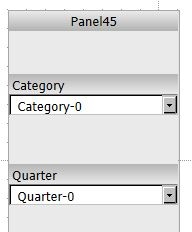
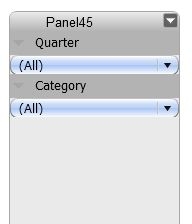
However, after running the document, the Quarter selector is back above the Category selector, like shown below.
STEPS TO REPRODUCE:
Follow these steps to reproduce the issue in Strategy Tutorial Project:
CAUSE:
This is a known issue in Strategy 9.x. The filter panel cannot detect the relative position changes made through keyboard manipulations.
ACTION:
Contact Strategy Technical Support for an update on this issue.
WORKAROUND:
Use the mouse to change the position of the selectors by dragging them so that the filter panel can detect their new positions.
