EducationSoftwareStrategy.com
StrategyCommunity

Knowledge Base

Product

Community

Knowledge Base

TopicsBrowse ArticlesDeveloper Zone

Product

Download SoftwareProduct DocumentationSecurity Hub

Education

Tutorial VideosSolution GalleryEducation courses

Community

GuidelinesGrandmastersEvents
x_social-icon_white.svglinkedin_social-icon_white.svg
Strategy logoCommunity

© Strategy Inc. All Rights Reserved.

LegalTerms of UsePrivacy Policy
  1. Home
  2. Topics

KB45612: Parent to Child relationships are not retained after saving and closing and then re-opening MicroStrategy Architect 9.4.x.


Community Admin

• Strategy


Parent to Child relationships are not retained after saving and closing and then re-opening MicroStrategy Architect 9.4.x

SYMPTOM:
 
Parent to child relationships are not retained in Strategy Architect when a user saves and closes and then re-opens Strategy Architect as seen below.
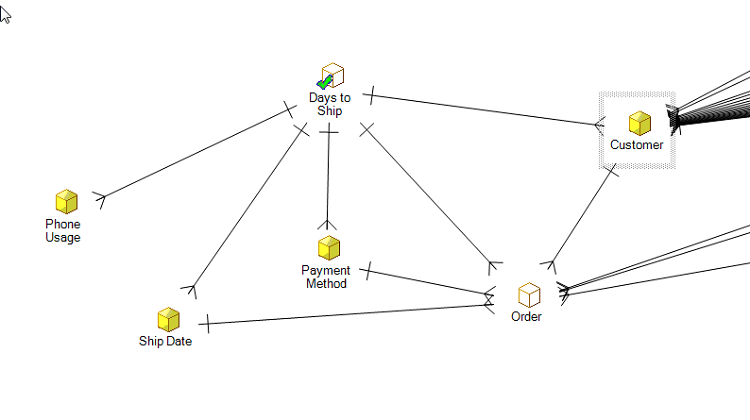
  • In Strategy Architect, make relationships for the Days to ship attribute with the following attributes: Phone Usage, Ship Date, Payment Method, Order, and Customer.
ka04W000000OgsxQAC_0EM440000002CYT.png
  • Save and close out of Strategy Architect.
  • Re-open Strategy Architect and delete the relationships created in step 1, do not save these changes.
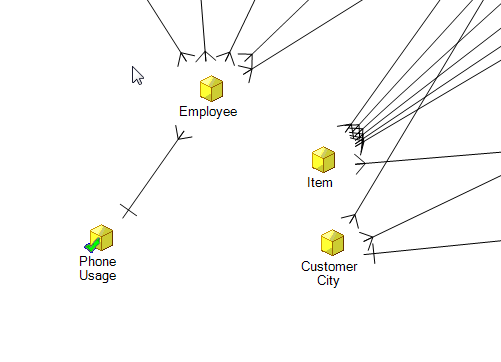
  • Create another set of relationships based on attribute Phone Usage with Employee, Item and Customer City respectively. Now save and exit.
ka04W000000OgsxQAC_0EM440000002CYY.png
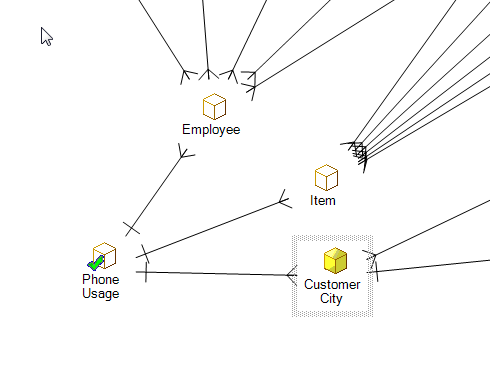
  • Open Strategy Architect again and notice that the relationships created in Step 4 have not been retained.
ka04W000000OgsxQAC_0EM440000002CYX.png

CAUSE:
 
This is a known issue in Strategy Architect 9.4.x
 
ACTION:
 
Contact Strategy Technical Support for an update on this issue.
 
WORKAROUND:
 
Create relationships using the Attribute Editor in Strategy Developer.


Comment

0 comments

Details

Knowledge Article

Published:

June 8, 2017

Last Updated:

June 8, 2017