EducationSoftwareStrategy.com
StrategyCommunity

Knowledge Base

Product

Community

Knowledge Base

TopicsBrowse ArticlesDeveloper Zone

Product

Download SoftwareProduct DocumentationSecurity Hub

Education

Tutorial VideosSolution GalleryEducation courses

Community

GuidelinesGrandmastersEvents
x_social-icon_white.svglinkedin_social-icon_white.svg
Strategy logoCommunity

© Strategy Inc. All Rights Reserved.

LegalTerms of UsePrivacy Policy
  1. Home
  2. Topics

KB45620: The Apply Control Defaults option does not work for Grid and Graph in a Report Services Document in MicroStrategy Web


Community Admin

• Strategy


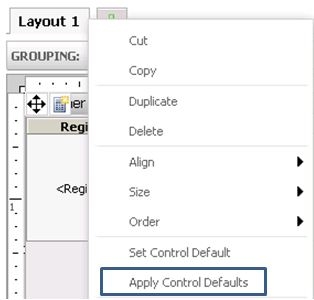
In MicroStrategy Web, the Apply Control Defaults option does not work for Grid and Graph in a Report Services Document

Symptom

In Strategy Web, the Apply Control Defaults option does not work for Grid and Graph in a Report Services Document:
 

ka04W000000OdY1QAK_0EM4400000026Mg.jpeg


Cause

This is a known issue in Strategy Web.


Action

Contact the Strategy Technical Support for an update on this issue.


Workaround

Use this option in Strategy Developer
 
 
NOTE: For additional information on the usage of  this option, refer to the Report Services Document Creation Guide manual of Strategy Analytics Enterprise, chapter 4. Formatting Documents, section Methods for formatting a control.


Comment

0 comments

Details

Knowledge Article

Published:

June 21, 2017

Last Updated:

June 21, 2017