EducationSoftwareStrategy.com
StrategyCommunity

Knowledge Base

Product

Community

Knowledge Base

TopicsBrowse ArticlesDeveloper Zone

Product

Download SoftwareProduct DocumentationSecurity Hub

Education

Tutorial VideosSolution GalleryEducation courses

Community

GuidelinesGrandmastersEvents
x_social-icon_white.svglinkedin_social-icon_white.svg
Strategy logoCommunity

© Strategy Inc. All Rights Reserved.

LegalTerms of UsePrivacy Policy
  1. Home
  2. Topics

KB45625: The "Report Details" and "Prompt Details" section shows English (United States) date formatting although a different locale has been selected for Number and Date Formatting in MicroStrategy Analytics Enterprise Web 9.4


Community Admin

• Strategy


SYMPTOM:
In Strategy Analytics Enterprise 9.4.x, users may select a different language locale for the Number and Date Format in the Preferences page, like shown below:

ka04W000000OfjfQAC_0EM4400000026On.jpeg

 
In this example, with French (Switzerland) selected, the expected format for dates is:


dd.mm.yyyy

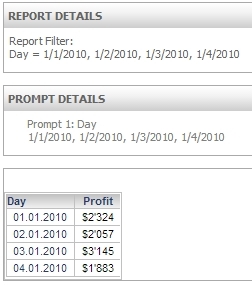
However, users may observe that in the 'Report Details' and 'Prompt Details' sections of a report, the date format is still English (US):

mm/dd/yyyy

 
When the elements are selected from an Attribute Element prompt, like shown below:
 

ka04W000000OfjfQAC_0EM4400000026Ox.jpeg

This issue may also cause correctly formatted dates being rejected in a date prompt, after the date format has been customized (see KB440717).
CAUSE:
This is a known issue with Strategy Analytics Enterprise Web 9.4.x.
ACTION:
This issue has been addressed in build 9.5.1000.0052. Consider upgrading to 9.5.1 or newer to take full advantage of this fix.
WORKAROUND:
Instead of an Attribute Element prompt, users can create a Qualification prompt to achieve the same filtering and still maintain the language locale, like shown below:
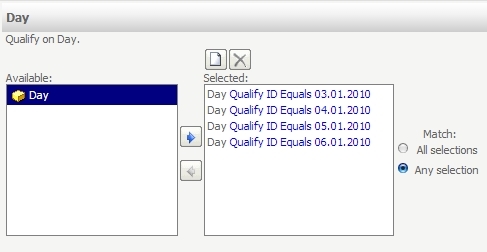
ka04W000000OfjfQAC_0EM4400000026Ov.jpeg

 
KB45625


Comment

0 comments

Details

Knowledge Article

Published:

June 8, 2017

Last Updated:

May 4, 2018