SYMPTOM:
The following connectivity error occurs when applying a configuration link to an iPad through a VPN tunneling using Windows Authentication in Strategy Mobile 9.3.x:
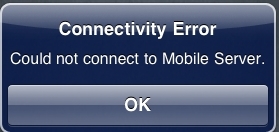
Connectivity Error
Could not connect to Mobile Server

CAUSE:
The Windows user specified in the Default Mobile Server Authentication in Strategy Mobile configuration hadn't had permissions granted to connect through VPN and access the Strategy Mobile Server.
ACTION:
In order to avoid this connectivity error, make sure that the referred Windows user has enough permission to access the Strategy Mobile Server through the VPN tunneling.
Third Party Software Installation Warning:
The third-party product(s) discussed in this technical note is manufactured by vendors independent of Strategy. Strategy makes no warranty, express, implied or otherwise, regarding this product, including its performance or reliability.
