EducationSoftwareStrategy.com
StrategyCommunity

Knowledge Base

Product

Community

Knowledge Base

TopicsBrowse ArticlesDeveloper Zone

Product

Download SoftwareProduct DocumentationSecurity Hub

Education

Tutorial VideosSolution GalleryEducation courses

Community

GuidelinesGrandmastersEvents
x_social-icon_white.svglinkedin_social-icon_white.svg
Strategy logoCommunity

© Strategy Inc. All Rights Reserved.

LegalTerms of UsePrivacy Policy
  1. Home
  2. Topics

KB45630: The "Display the home screen" event 3995 does navigate to the home document when executed from outside the application after terminating it in MicroStrategy Mobile 9.4.0.


Community Admin

• Strategy


How to fix a case so that the user goes to the MicroStrategy Mobile app homescreen,

SYMPTOM:
 
The Strategy Mobile 9.4.0 event parameter 3995, as explained in the MSDL article:
https://resource.microstrategy.com/MSDZ/MSDL/AnalyticsEnterprise/docs/mergedProjects/mobilesdk/topics/android/URLAPI/andr_URLAPI_Displaying_the_Home_Screen.htm 
 
Is to take the user to the Strategy Mobile app homescreen. However, when the mobile home page is set to a custom home screen and that document contains a link to another document, if that link is triggered and then the Strategy Mobile app is terminated, and the event parameter is triggered from outside of the Strategy Mobile app, it does not take the user back to the homescreen document, in Strategy Mobile 9.4.0. It instead takes the user back to the last document visited.
 
STEPS TO REPRODUCE
 
Using Strategy Tutorial, use the following steps to reproduce this issue.
ka04W000000Oh5NQAS_0EM440000002A9h.jpeg
  1. Create two blank documents and save as Doc1 and Doc2.
  2. Create a link in Doc1 pointing to Doc2, such as Edit links or URL API.
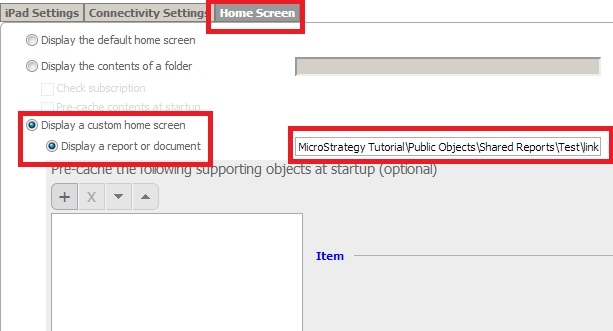
  3. Create a mobile configuration, with the configuration home page to "Display a custom homescreen" and set the homescreen to Doc1, like shown below: 
  4. Apply the configuration link to Strategy Mobile 9.4.0 app, the homescreen should display Doc1.
  5. Click the link for Doc2.
  6. Close out of the app and terminate it.
  7. In the Safari URL bar, enter and execute the following:


    Sample Code/Error
    
    mstr://?evt=3995


  8. Instead of navigating to Doc1, this will instead navigate to Doc2.

 
CAUSE:
 
This is a known issue in Strategy Mobile 9.4.0, that only occurs after terminating the application completely.
 
ACTION:
 
Contact Strategy Technical Support if this issue occurs.
 
WORKAROUND:
 
Instead of terminating the Strategy Mobile 9.4.0 application before executing the event on Safari, close close out of it, without terminating it. 


Comment

0 comments

Details

Knowledge Article

Published:

June 5, 2017

Last Updated:

June 5, 2017