Is it possible to convert a .mht file to a .rst file in order to take advantage of Strategy Developer Portable Documents?
No, this will not be possible because these two types of files are inherently different.
First, a .mht is a web page archive format used to represent flash content in a single file. This means that the data can easily be re-accessed without connectivity to the server in order to populate date. Sample documents/dashboards can easily downloaded in .mht format from http://www2.microstrategy.com/software/business-intelligence/dashboards-and-scorecards/gallery/
While these files show many different ways businesses can use Strategy, these files can not be converted to .rst format. A .rst file, that is used in document templates, contain a lot more Strategy related formatting information that would be used for creating standalone documents that could connect to external information. A .rst file needs to be a lot more flexible because it dynamically changes due to external information. Strategy offers the ability to import and export these .rst files in order for businesses to keep formatting consistent throughout many different documents. More information on how to import these files can be found in:
TN: 35426: New feature in Strategy Desktop 9.0.2: Portable Documents
How can a user utilize preexisting features of Strategy to take advantage of Strategy Desktop Portable Documents?
While it is not possible to convert a .mht file to an .rst file, Strategy Tutorial contains document templates that are currently in .rst format. Users can use these templates and import their own data using the formatting from the Strategy Tutorial document format.
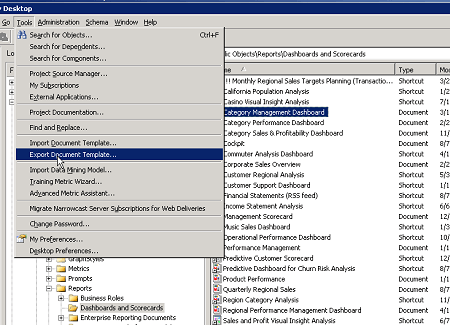
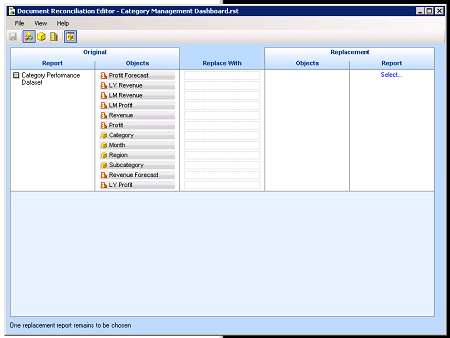
Below, are steps a user can take to import the dashboard from a Strategy Tutorial Project to their own project. Some of the additional flash and design is missing from the rst. file, but the file is functional with external data. Note, that it will be essential to have the same amount of metrics and attributes used in the desired reports as the dashboard has.