EducationSoftwareStrategy.com
StrategyCommunity

Knowledge Base

Product

Community

Knowledge Base

TopicsBrowse ArticlesDeveloper Zone

Product

Download SoftwareProduct DocumentationSecurity Hub

Education

Tutorial VideosSolution GalleryEducation courses

Community

GuidelinesGrandmastersEvents
x_social-icon_white.svglinkedin_social-icon_white.svg
Strategy logoCommunity

© Strategy Inc. All Rights Reserved.

LegalTerms of UsePrivacy Policy
  1. Home
  2. Topics

KB45639: An Information Window disappears after scrolling through the search results of a search box selector in MicroStrategy Web 9.4.1.


Community Admin

• Strategy


An Information Window disappears after scrolling through the search results of a search box selector in MicroStrategy Web 9.4.1.

SYMPTOM:
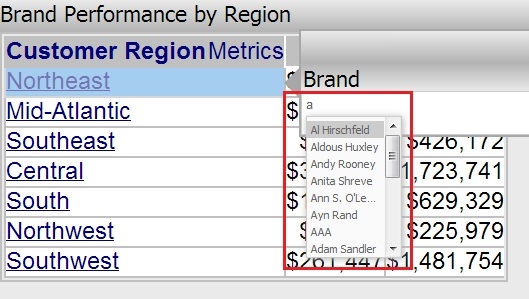
A user can configure a grid to trigger an Information Window that then contains a search box selector that targets a different object.  When typing an item into the search box of the selector, a dropdown box will appear to display the search results, as seen below.
 

ka04W000000ObvsQAC_0EM4400000026N6.jpeg

 
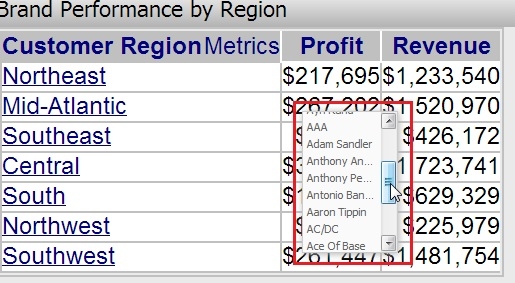
However, if the user then attempts to scroll down on the search results, the information window containing the selector will disappear, leaving only the dropdown field visible, like seen below.
 

ka04W000000ObvsQAC_0EM4400000026N4.jpeg

 
STEPS TO REPRODUCE:
  
Follow these steps to reproduce this issue in a Strategy Tutorial Project.

  1. Create a report with the attributes Customer Region and and Brand and the metrics Profit and Revenue.
  2. Convert this report into a document.
  3. Add a Panel Stack and a search box selector based of the attribute 'Brand'.
  4. Place the search box selector inside the panel stack and define its target to be a grid with just Brand in it.
  5. Set the Panel Stack  to act as an Information Window.
  6. Configure the attribute 'Customer Region' on the grid to act as a selector pointing to the info window.
  7. Run the document in Express Mode.
  8. Click on 'Northeast' and type 'a' into the Brand search box selector.
  9. Notice how a dropdown field appears for all Brands that begin with the letter 'a'.
  10. Scroll down the list and notice that after scrolling, the panel stack disappears and only the dropdown field is visible.

CAUSE:
This is a known issue in Strategy 9.4.1.
 
ACTION:
This issue has been addressed with Strategy 10.x. Upgrade to take advantage of the fix.


Comment

0 comments

Details

Knowledge Article

Published:

May 31, 2017

Last Updated:

May 31, 2017