SYMPTOM:
When using totals on a grid in Visual Insight in Strategy Web 9.3.1, the totals will display at the bottom of the grid like shown below.
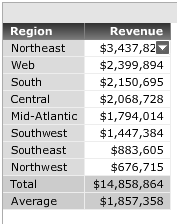
Sorting on an attribute or metric will sort the rows on the grid separately from the totals, which means the totals will remain at the bottom of the grid. This is the expected behavior.
However, after saving this Visual Insight report and re-executing it, if the user were to sort the metric one more time, the totals will now be sorted within the rows of the grid, like shown below.

STEPS TO REPRODUCE:
Follow these instructions in a Strategy Tutorial Project:

CAUSE:
This is a known issue in Visual Insight dashboards in Strategy Web 9.3.1.
ACTION
This issue is fixed in Strategy Web 9.5.1.Please upgrade to take advantage of the fix.
WORKAROUND
If the sort is performed before saving the dashboard and the dashboard is then saved, the correct sorting will always be displayed during the initial run. However this will not prevent the issue from happening if the user sorts the grid again.
