EducationSoftwareStrategy.com
StrategyCommunity

Knowledge Base

Product

Community

Knowledge Base

TopicsBrowse ArticlesDeveloper Zone

Product

Download SoftwareProduct DocumentationSecurity Hub

Education

Tutorial VideosSolution GalleryEducation courses

Community

GuidelinesGrandmastersEvents
x_social-icon_white.svglinkedin_social-icon_white.svg
Strategy logoCommunity

© Strategy Inc. All Rights Reserved.

LegalTerms of UsePrivacy Policy
  1. Home
  2. Topics

KB45641: Re-prompting a presentation containing reports that are based on the same standalone prompt object will not share prompt answers in Microsoft Powerpoint in MicroStrategy Office 9.4.1.


Community Admin

• Strategy


Re-prompting a presentation containing reports that are based on the same standalone prompt object will not share prompt answers in Microsoft Powerpoint in MicroStrategy Office 9.4.1.

SYMPTOM:
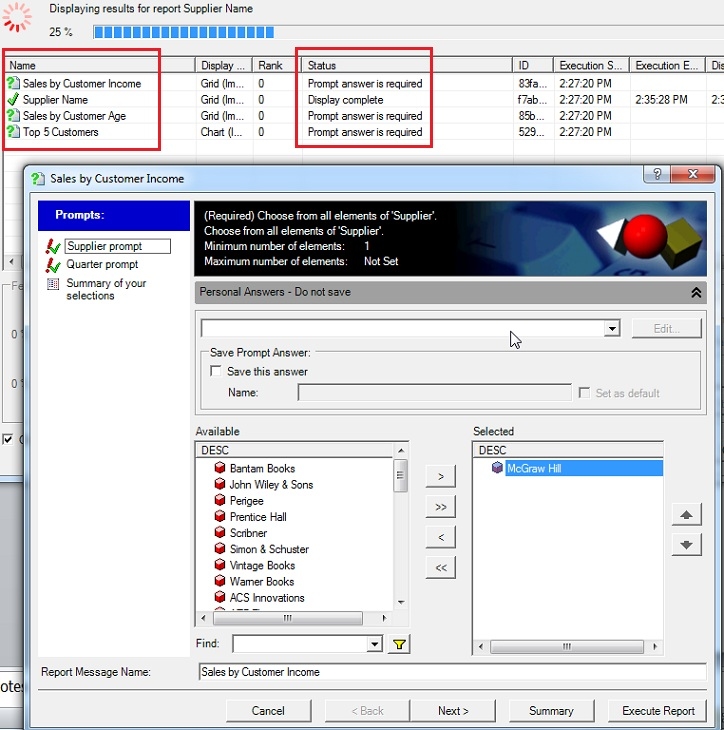
When re-prompting a PowerPoint presentation with reports containing the same prompt, the prompt will require an answer for each individual report based on that prompt, instead of repeating the answer throughout all reports with the same prompt. This occurs in Strategy Office 9.4.1. 
 

ka04W000000OhFcQAK_0EM4400000026N1.jpeg

 
As seen above, after the prompt has been answered once for the Supplier Name report, the prompt appears again and is required for all other reports despite having been answered once already. 
STEPS TO REPRODUCE:
Follow these steps to reproduce in a Strategy Tutorial project.

  • Open Microsoft PowerPoint.
  • Navigate to the folder Strategy Platform Capabilities > Strategy Office.
  • Run the reports 'Sales by Customer Age', 'Sales by Customer Income', 'Supplier Name', and 'Top 5 Customers', which are all based on the same prompt on the Supplier attribute. 
  • After initially running each of these, go to Refresh > 'Re-prompt Presentation' as seen below. 
ka04W000000OhFcQAK_0EM4400000026N3.png
  • Notice how the same prompt pops up to be answered 4 times in a row, once for each report in the presentation that uses this prompt. 

CAUSE:
 
This is a known issue in Strategy Office 9.4.1, that did not occur before in Strategy Office 9.2.1.  
 
ACTION:
The issue has been fixed in Strategy 10. Please upgrade to this version to take advantage of the fix.
WORKAROUND:
Using Re-execute instead of Re-prompt will show the prompts only once.


Comment

0 comments

Details

Knowledge Article

Published:

May 30, 2017

Last Updated:

May 30, 2017