Starting in Strategy 9.3.1, additional logging is available for Distribution Services. The "Persist Results Detail" log is useful when troubleshooting the tasks that are created for a Distribution Services subscription. The trace can be found in the Strategy Diagnostics and Performance Logging tool as shown below.
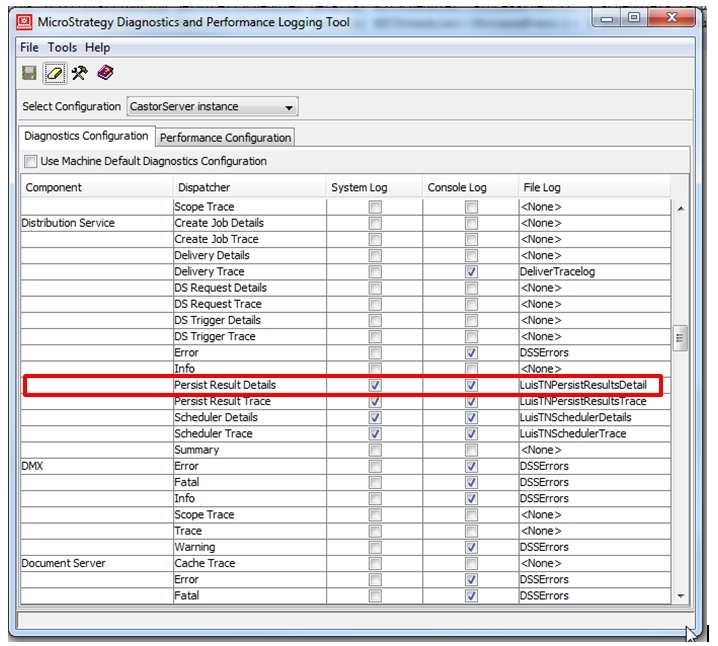
Note: This trace is not enabled by default. An existing or new "File Log" destination must be selected for this logging to be used.
When a subscription is executed, subsequent tasks are created for Distribution Services. This trace will display a summary about these created tasks, or if a failure to create the tasks occurs. When the tasks run, a sample of entries logged by the trace is shown below:
Sample Code/Error
2013-12-20 21:21:12.390-05:00 DSSPersistResultTask::hProcessAlertCondition(), Its lAlertID = 00000000000000000000000000000000, lAlert = . <Subscription 'My Test Report 23 12/20/13 9:12:47 PM' (ID = AB791CB244395DE6BAEB4EA0710E005D), Contact 'Administrator' (ID = 54F3D26011D2896560009A8E67019608) Schedule Execution ID = 94FF186444948EC7BA256E847A407476>
2013-12-20 21:21:12.393-05:00 DSSPersistResultTask::hProcessRunReportAsDocument(), lDeliveryType = 16 and lbIsCacheUpdateForMobile = false.<Subscription 'My Test Report 23 12/20/13 9:12:47 PM' (ID = AB791CB244395DE6BAEB4EA0710E005D), Contact 'Administrator' (ID = 54F3D26011D2896560009A8E67019608) Schedule Execution ID = 94FF186444948EC7BA256E847A407476>
2013-12-20 21:21:12.395-05:00 DSSPersistResultTask::hProcessRunReportAsDocument(), bIsIPad = false, bIsIPhone = false, bIsFlagSet = false.<Subscription 'My Test Report 23 12/20/13 9:12:47 PM' (ID = AB791CB244395DE6BAEB4EA0710E005D), Contact 'Administrator' (ID = 54F3D26011D2896560009A8E67019608) Schedule Execution ID = 94FF186444948EC7BA256E847A407476>
