EducationSoftwareStrategy.com
StrategyCommunity

Knowledge Base

Product

Community

Knowledge Base

TopicsBrowse ArticlesDeveloper Zone

Product

Download SoftwareProduct DocumentationSecurity Hub

Education

Tutorial VideosSolution GalleryEducation courses

Community

GuidelinesGrandmastersEvents
x_social-icon_white.svglinkedin_social-icon_white.svg
Strategy logoCommunity

© Strategy Inc. All Rights Reserved.

LegalTerms of UsePrivacy Policy
  1. Home
  2. Topics

KB45675: Grid columns with zero width still appear on a Transaction Services Document in MicroStrategy Web 9.x, after the "Mark Rows for Selection" option is enabled.


Community Admin

• Strategy


Grid columns with zero width still appear on a Transaction Services Document in MicroStrategy Web 9.x, after the "Mark Rows for Selection" option is enabled.

SYMPTOM:
When users set column width in a Transaction Services Document to zero and the "Mark Rows for Selection" option is enabled, the column still displays.
 
STEPS TO REPRODUCE:
  • In 9.x Strategy Web, access the Strategy Tutorial Project.
  • In Design mode, open the "Monthly Regional Sales Targets Planning" document in the following location - Strategy Analytics Modules\Strategy Tutorial\Public Objects\Reports\Strategy Platform Capabilities.
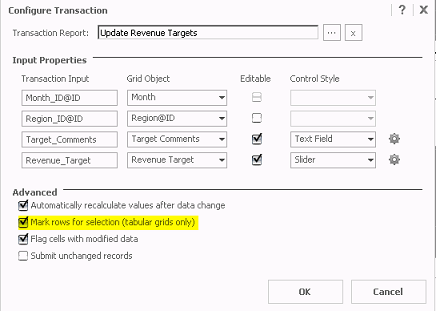
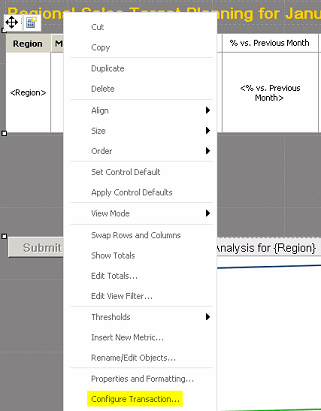
  • Right click the grid, make sure the grid is actually selected, and click the "Configure Transaction". 
     
ka04W000000OaUkQAK_0EM4400000026Q9.png
  • Select the "Mark rows for selection" option and click OK to save the change. This option displays a check box beside each row of data in a grid, to allow the user to choose which values to use to update their data. The option is only available for grids. 
     
ka04W000000OaUkQAK_0EM4400000026Q7.png
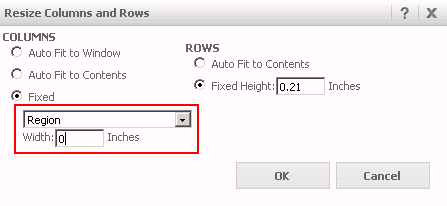
  • Execute the report in Editable mode.  Right-click the Region column and select "Resize Columns and Rows...". Set the Region's column width to "0" and click OK. Notice the Region column is now invisible. You may also notice the Month column is invisible because it is also set to "0" column width by default in this grid. 
     
     
ka04W000000OaUkQAK_0EM4400000026Q3.png
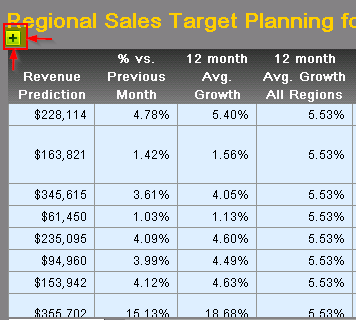
  • Execute the document in Express mode and click the little plus sign on the top-left corner of the grid that was just modified to show the check boxes for each row.  
     
     
ka04W000000OaUkQAK_0EM4400000026Q5.png
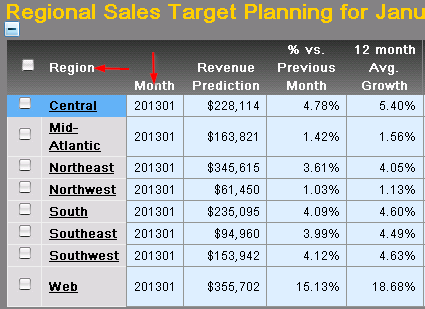
  • Once the check-boxes appear, notice the Region column displays, although its width was set to zero. The same applies for the Month column.
     
ka04W000000OaUkQAK_0EM4400000026QD.png

CAUSE:
This is a known issue in Strategy Web 9.x using Transaction Services Documents.
 
ACTION:
Please follow up with Strategy Technical Support for the latest update on this issue.
 
  
KB45675


Comment

0 comments

Details

Knowledge Article

Published:

June 20, 2017

Last Updated:

December 28, 2018