EducationSoftwareStrategy.com
StrategyCommunity

Knowledge Base

Product

Community

Knowledge Base

TopicsBrowse ArticlesDeveloper Zone

Product

Download SoftwareProduct DocumentationSecurity Hub

Education

Tutorial VideosSolution GalleryEducation courses

Community

GuidelinesGrandmastersEvents
x_social-icon_white.svglinkedin_social-icon_white.svg
Strategy logoCommunity

© Strategy Inc. All Rights Reserved.

LegalTerms of UsePrivacy Policy
  1. Home
  2. Topics

KB45678: How to enable HTTPOnly attribute on JSESSIONID cookie for MicroStrategy Web 9.4.1 in tomcat 7?


Community Admin

• Strategy


How to enable HTTPOnly attribute on JSESSIONID cookie for MicroStrategy Web 9.4.1 in tomcat 7

HttpOnly is an additional flag included in a Set-Cookie HTTP response header. Using the HttpOnly flag when generating a cookie helps mitigate the risk of client side script accessing the protected cookie (if the browser supports it). To support HTTPOnly attribute on JSESSIONID cookie, it's requires web containers to support servlet 3.0 and JDK 1.6 and above. In this document, it's introduced how to enable HTTPOnly attribute for Strategy Web 9.4.1 in tomcat 7 (tomcat 6 doesn't support servlet 3.0 so tomcat 7 is required).
 
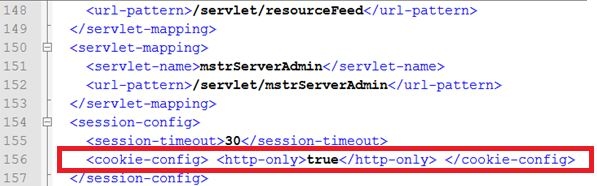
1. Add the following line within <session-config> tag in web.xml under WEB-INF folder:
 
<session-config> <cookie-config> <http-only>true</http-only> </cookie-config> </session-config>
ka04W000000Of0aQAC_0EM4400000026Pl.jpeg

 
2. Save the change and restart tomcat.


Comment

0 comments

Details

Knowledge Article

Published:

June 16, 2017

Last Updated:

June 16, 2017