EducationSoftwareStrategy.com
StrategyCommunity

Knowledge Base

Product

Community

Knowledge Base

TopicsBrowse ArticlesDeveloper Zone

Product

Download SoftwareProduct DocumentationSecurity Hub

Education

Tutorial VideosSolution GalleryEducation courses

Community

GuidelinesGrandmastersEvents
x_social-icon_white.svglinkedin_social-icon_white.svg
Strategy logoCommunity

© Strategy Inc. All Rights Reserved.

LegalTerms of UsePrivacy Policy
  1. Home
  2. Topics

KB45695: Manually set graph series type changes to default after drilling within the document and re-prompting in Web in 9.x


Stefan Zepeda

Salesforce Solutions Architect • Strategy


This technical note outlines a known issue in which Manually set graph series type changes to default after drilling within the document and re-prompting in Web in 9.x. This issue has been fixed in MicroStrategy Web 9.4.1 HF3 and above.

SUMMARY:
This technical note outlines a known issue in which Manually set graph series type changes to default after drilling within the document and re-prompting in Web in 9.x. This issue has been fixed in Strategy Web 9.4.1 HF3 and above.
 
STEPS TO REPRODUCE:
Follow the steps below to reproduce the issue in Tutorial project:

  • In Strategy Developer, create a report with attribute in row, in report objects but not in the grid, and in columns.
  • Create or insert an attribute element prompt in report filter, as shown below:
ka02R000000kckfQAA_0EM440000002CWO.jpeg
  • Run the report in Grid Graph View, and select "Vertical Bar:Stacked" as graph type.
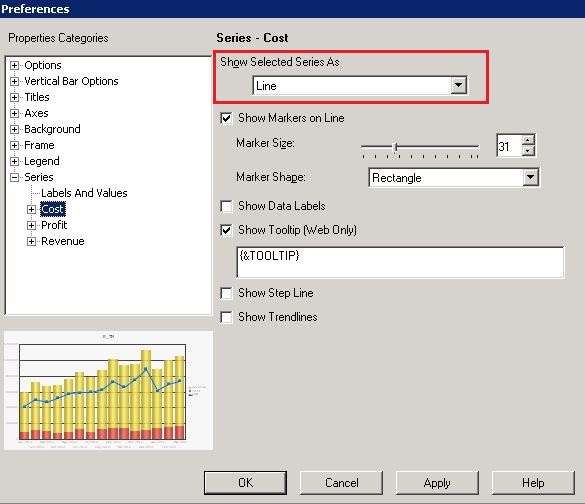
  • Go to Graph Preferences -> Series -> Cost, and change series type from default to Line, as shown below:
ka02R000000kckfQAA_0EM440000002CWt.jpeg
  • Save and close the report.
  • In Strategy Web, right mouse click on the report -> Create Document.
  • Save the document.
  • Run the document in Strategy Web, and accept default prompt answers. The document result is as shown below:
ka02R000000kckfQAA_0EM440000002CWM.jpeg
  • Right mouse click on attribute Month in grid -> Drill -> Year, and the document result is as shown below (still in the same document because Year is in the dataset):
ka02R000000kckfQAA_0EM440000002CWP.jpeg
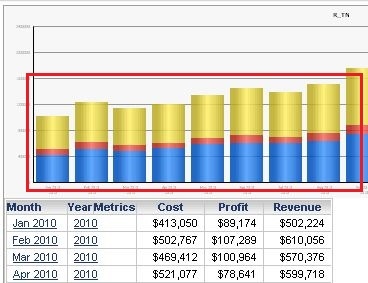
  • Go to document menu -> Data -> Re-prompt, and keep the default prompt answers. Run the document and series type changes from manually 'Line' to default, as shown below:
ka02R000000kckfQAA_0EM440000002CWq.jpeg

CAUSE:
This is a known issue with Strategy Web 9.x.
 
ACTION:
This issue has been addressed in Strategy Web 9.4.1 HF3. Upgrade to this version to take advantage of the fix. 


Comment

0 comments

Details

Knowledge Article

Published:

March 31, 2017

Last Updated:

March 31, 2017