EducationSoftwareStrategy.com
StrategyCommunity

Knowledge Base

Product

Community

Knowledge Base

TopicsBrowse ArticlesDeveloper Zone

Product

Download SoftwareProduct DocumentationSecurity Hub

Education

Tutorial VideosSolution GalleryEducation courses

Community

GuidelinesGrandmastersEvents
x_social-icon_white.svglinkedin_social-icon_white.svg
Strategy logoCommunity

© Strategy Inc. All Rights Reserved.

LegalTerms of UsePrivacy Policy
  1. Home
  2. Topics

KB45698: How to display names for DayOfWeek values in metrics and attributes in MicroStrategy


Stefan Zepeda

Salesforce Solutions Architect • Strategy


This technical note documents the steps to display names for DayOfWeek values in metrics and attributes in MicroStrategy

In some business scenarios, it is required to display names for DayOfWeek values (e.g. Sunday, Monday, etc.) in metrics or attributes in Strategy.
Follow the steps below to achieve the requirement:
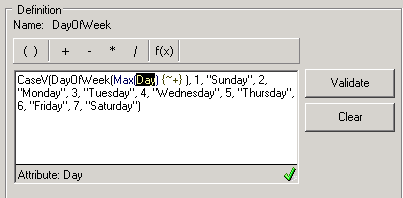
 

  • Create a new metric with following expression:
ka0PW00000018wPYAQ_0EM440000002CWJ.png
  • 
    CaseV(DayOfWeek(Max(Day) {~+} ), 1, "Sunday", 2, "Monday", 3, "Tuesday", 4, "Wednesday", 5, "Thursday", 6, "Friday", 7, "Saturday")
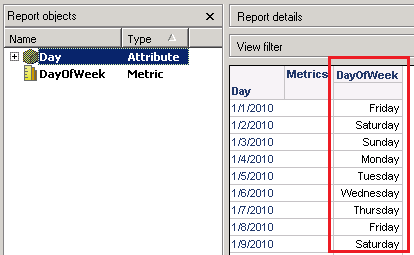


  • Create a report with the attribute and the new metric. The metric will show names for DayOfWeek values, as shown below:
ka0PW00000018wPYAQ_0EM440000002CWH.png

Oracle 11g is used as an example here.
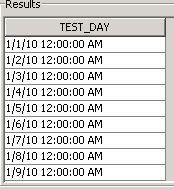
  • Create a table with following data:
ka0PW00000018wPYAQ_0EM440000002CWN.jpeg
  • NOTE: Following SQL may be used to create table and insert data:


    CREATE TABLE TEST_DAY (TEST_DAY DATE);
    
    INSERT INTO TEST_DAY VALUES (to_date('01/01/2009','mm/dd/yyyy'));
    
    …


  • Create a database instance in Strategy Developer to point to the database.
  • Import table into project from Warehouse Catalog.
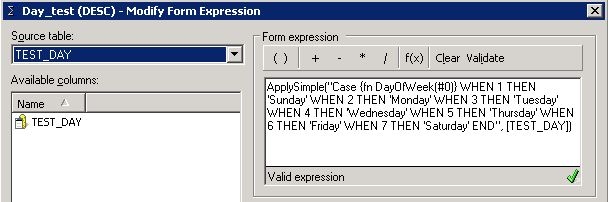
  • Create an attribute and create an attribute form with following expression:
ka0PW00000018wPYAQ_0EM440000002CWK.jpeg
  •  

    
    ApplySimple("Case {fn DayOfWeek(#0)} WHEN 1 THEN 'Sunday' WHEN 2 THEN 'Monday' WHEN 3 THEN 'Tuesday' WHEN 4 THEN 'Wednesday' WHEN 5 THEN 'Thursday' WHEN 6 THEN 'Friday' WHEN 7 THEN 'Saturday' END", )


    NOTE:{fn DayOfWeek()} function in Oracle is used in the above example.
     
  • Save and close the attribute.
  • Update schema.
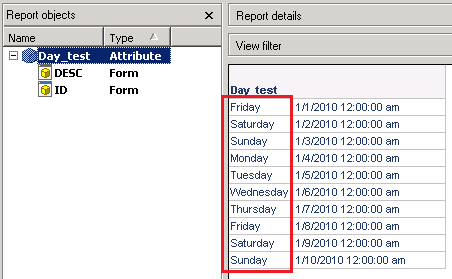
  • Create a report with the new attribute. The metric will show names for DayOfWeek values, as shown below:
ka0PW00000018wPYAQ_0EM440000002CWF.png


Comment

0 comments

Details

Knowledge Article

Published:

May 11, 2017

Last Updated:

March 7, 2024