SUMMARY:
This technical note shows how to solve one particular cause of the error "Invalid metric formula". The cause described in this technical note is due to incorrect syntax of the metric formula. The impact is limited to Strategy Analytics Desktop 9.x and 10.x product only with dashboards using new derived metrics. The correct solution is described in this document, but there are other solutions available here for similar errors.
SYMPTOM:
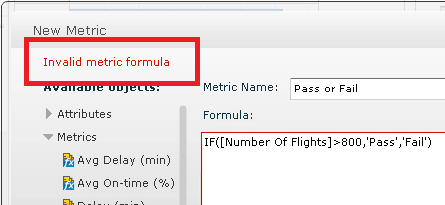
When trying to create a new derived metric with text output, users receive the error "Invalid metric formula". This occurs in dashboards viewed in Strategy Analytics Desktop 9.x and 10.x.
Sample Code/Error
Invalid metric formula
STEPS TO REPRODUCE:
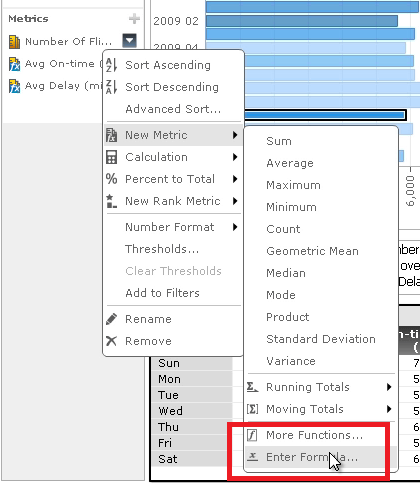
Follow these instructions to reproduce the issue in Strategy Analytics Desktop 9.x and 10.x.
Video:
You can find a detailed video on how this issue is reproduced here: Tech Note 45708. Steps to reproduce
CAUSE:
The cause of this issue is because single quotations are being used in the formula. Single quotations are not allowed in metric formulas for Strategy Analytics Desktop 9.x and 10.x, and this is the incorrect way to specify text output in a metric. The correct way to specify text output is to use double quotations around the text.
ACTION:
When creating a formula to display text, include double quotations around the text instead of single quotes. Below is a correct formula:
Sample Code/Error
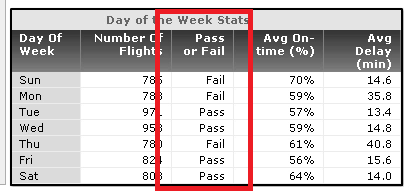
IF(>800,"Pass","Fail")
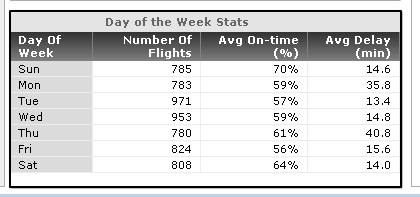
The formula should show correctly in the grid like seen below.
ADDITIONAL TROUBLESHOOTING:
If the steps above do not resolve the issue, consider calling Strategy technical support with the following information of troubleshooting already done:
TO LEARN MORE:
Related technotes:
TN43576 "Formula Incorrect" error displayed when attempting to validate a metric in the highest level of the metric editor, when it validates without error in the formula section of the metric editor in Strategy 9.3.0 or 9.3.1.
TN41618 "Formula Incorrect" error message for a valid expression when editing a metric in the Metric Editor.
TN13776 How to create a metric that will use an ‘If’ statement to perform different calculations based on the values returned by a second metric in Strategy Desktop 8.x and 9.0.x
Strategy Analytics Desktop Help
Section: Interfaces for Data Import, Visualizations and Functions > Interfaces for functions > New Metric dialog box
