The behavior has changed in Strategy 9.3 and later. Windows stay true to the size of the actual panel. Settings need to be modified so that all the data can shown.
Export that gets cutoff:
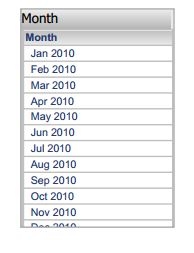
Settings have changed from earlier versions to better support documents/dashboards and the introduction of Mobile. Panels are designed to stay at one size, especially with exports, so that panels and windows are not overlapping. However, the one caveat is that data sometimes gets cut-off for the sake of the design of the dashboard.
1. Right-Click on Grid and go to 'Properties and Formatting'.
2. You must disable the Title Bar for this to work. Make sure 'Show Title Bar' is unchecked.
3. Go to 'Layout' and change 'Grid Overflow (PDF & Excel)' to 'Fit to grid contents'.
**Note that if the Title Bar is not unchecked, this option will not be visible.
4. Also in the 'Layout' menu, change the Width and Height to 'Fit to contents'.
5. Right-click the background of the dashboard and go to 'Properties and Formatting'.
6. In 'Layout', make sure 'Height can shrink' and 'Height can grow' are checked.
Export the dashboard and the data should be expanded to show.
Now the export should show all data&columns:

