EducationSoftwareStrategy.com
StrategyCommunity

Knowledge Base

Product

Community

Knowledge Base

TopicsBrowse ArticlesDeveloper Zone

Product

Download SoftwareProduct DocumentationSecurity Hub

Education

Tutorial VideosSolution GalleryEducation courses

Community

GuidelinesGrandmastersEvents
x_social-icon_white.svglinkedin_social-icon_white.svg
Strategy logoCommunity

© Strategy Inc. All Rights Reserved.

LegalTerms of UsePrivacy Policy
  1. Home
  2. Topics

KB45713: Attribute elements are displayed in a scientific notation in a prompt in MicroStrategy Developer 9.x


Stefan Zepeda

Salesforce Solutions Architect • Strategy


Attribute elements are displayed in a scientific notation in a prompt in MicroStrategy Developer 9.x

SYMPTOM:
Long digit numbers are displayed in a scientific notation when Teradata V14 is used as a data warehouse.
 
STEPS TO REPRODUCE:
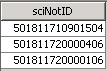
1. In the data warehouse, create a table and populate the table as follows:
 
CREATE TABLE sciNotation
(
    sciNotID DECIMAL(17)
);
 

ka02R000000kWy4QAE_0EM440000002CY5.jpeg

 
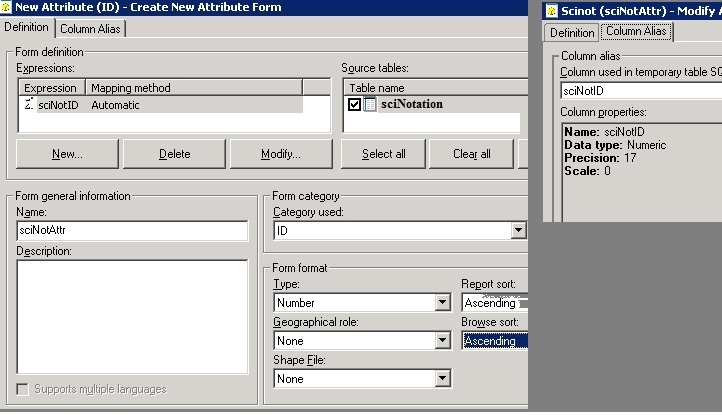
2. Create an attribute and define as below:
ka02R000000kWy4QAE_0EM440000002CYJ.jpeg


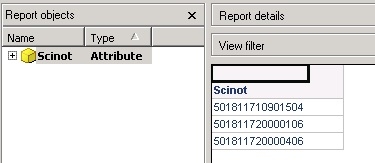
3. The attribute elements are displayed correctly in a report execution. When it is shown in a prompt, however, the elements are displayed in a scientific notation.
ka02R000000kWy4QAE_0EM440000002CY0.jpeg


CAUSE:
This is a known issue in Strategy Developer 9.x.
 
WORKAROUND:
Follow the steps below to implement a workaround.
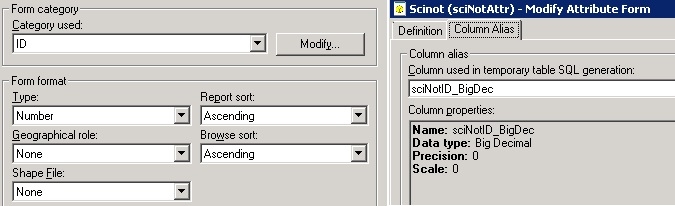
1. While keeping the form format type to ‘Number’, change the data type of the column alias to ‘Big Decimal’ as follows
ka02R000000kWy4QAE_0EM440000002CYG.jpeg

2. Save and close the attribute editor, and Update Schema.
3. Within the Administration -> Projects -> purge all types of cache, so the report cannot display the previous values.
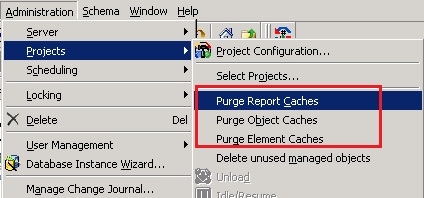
ka02R000000kWy4QAE_0EM440000002CYH.jpeg

 
Now, the attribute elements are displayed as expected in a prompt. 
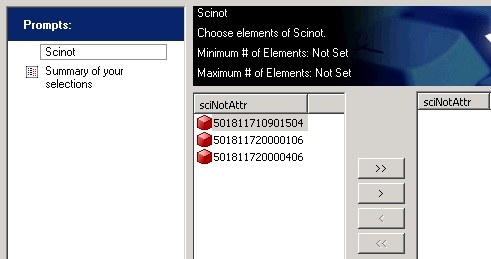
ka02R000000kWy4QAE_0EM440000002CXz.jpeg


Comment

0 comments

Details

Knowledge Article

Published:

April 13, 2017

Last Updated:

April 13, 2017