The first section of this article shows how to access the Count Parameters while the second part explains the purpose of the UseLookupForAttributes parameter.
First, create a Metric that uses the Count function as seen in the screenshot below:

The parameters of the Count function may be accessed by right clicking on "Count" and choosing Count parameters at the bottom of the list, as seen below:


-------------------
Only when the functions are defined on an attribute, is the parameter valid and its default value is true.
The way to calculate function (Attribute) against the global lookup table is in cube join. First, generate a new template including all the attributes in the grid together with function (Attribute) metric. Calculate this new grid without a grid source (treat grid source as NULL), and then the exact same behavior could be obtained as the SQLEngine. The value is not be affected by the dataset which the metric is attached to.
The value is affected by the dataset which the metric is attached to.
Details are shown below:
For example, create two reports. R01: Category, Cost and report filter: Category is books.
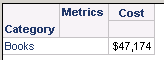
R02: Category, Profit, report filter: Category is Music and Movies.

Create a document based on these reports.
Create four derived metrics from the base metrics to calculate the quantity of Category and create them on different datasets:
Aggregate from base metric can be defined as
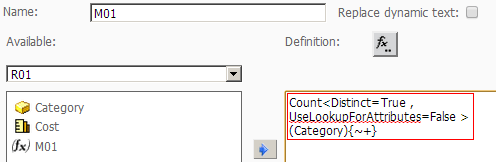
M01, M02, M03 and M04 are defined with the following formula:
M01=Count<Distinct=True , UseLookupForAttributes=False >(Category){~+} attached to R01.
M02=Count<Distinct=True , UseLookupForAttributes=False>(Category){~+} attached to R02.
M03= Count<Distinct=True , UseLookupForAttributes=True >(Category){~+} attached to R01.
M04=Count<Distinct=True, UseLookupForAttributes=True>(Category){~+} attached to R02.

