SUMMARY:
This issue is working as designed in Strategy Web 9.x and 10.x Which have no objects in the rows or have no objects in the columns. There are two workarounds to address this issue which are discussed in this document.
SYMPTOM:
The user creates a report with only attributes in the rows. The report does not have any objects in the columns. When the user runs the report in Strategy web, A column with the text "Drop objects here to add columns" and "Drop Metrics here to add data" will display. This also occurs for grids in report services documents that do not have any objects on the columns.
STEPS TO REPRODUCE:
1. Create a report with only the Year and quarter attributes on the rows.
2. Run this report in Strategy Web.
3. In the Tools Menu, select Report Objects to display the Object Browser window.
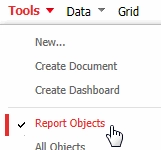
4. The report will display an additional column with the text "Drop objects here to add columns" and "Drop Metrics here to add data"

CAUSE:
This is working as designed in Strategy Web. When the Object Browser is displayed, Strategy concludes that the user is going to add additional objects to the report.
ACTION:
There are two possible actions to address this issue:
--Disable the Object Browser window by clicking the close button in the top left
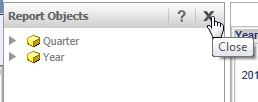
--Uncheck the "display empty grid axes in view mode" option in Web Preferences under grid display. Disabling this option will remove the "Drop objects here to add columns" and "Drop Metrics here to add data" text. This option is enabled by default.

