Question:
How to enable the Intelligence Server to perform LDAP group search and authorization for users performing Integrated (Kerberos) authentication in Strategy 9.3.1 Hotfix 2 and newer releases.
Answer:
With the release of Strategy 9.3.1 Hotfix 2, the Intelligence Server has been enhanced to offer additional functionality for users authenticating against the Intelligence Server using Integrated authentication (Kerberos authentication). Users can now use Integrated authentication and the Intelligence Server can retrieve their LDAP group membership from a LDAP repository and dynamically link those groups to the user session. The user will then gain the privileges (authorizations) and access assigned to the linked groups.
To enable this functionality, the following conditions must be met:
a. The Intelligence Server (and Strategy Web as needed) must be configured for Integrated (Kerberos) authentication and users must be able to successfully authenticate using this authentication mode.
b. The Intelligence Server must be configured for LDAP authentication, with the configuration using the same Active Directory domain as the LDAP server as the one used for Integrated authentication.
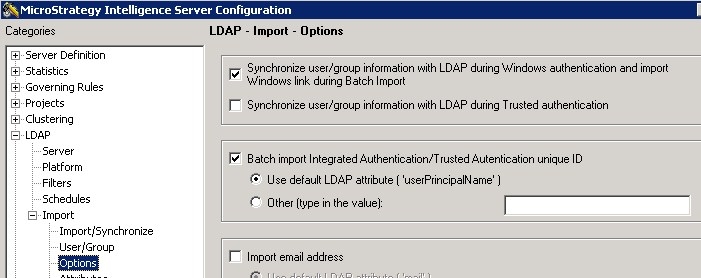
c. In the Intelligence Server configuration for LDAP under the Import -> Options settings, the option for 'Synchronize user/group information with LDAP during Windows authentication and import Windows Link during Batch Import' must be enabled (shown below).
d. In addition the option for 'Batch import Integrated Authentication/Trusted Authentication unique ID' should be enabled, and the correct LDAP attribute for the unique ID used by Integrated Authentication must be chosen (default 'userPrincipalName' for Active Directory) as shown below:
After making these changes, users should now be able to login using Integrated authentication and have their LDAP group membership applied to their sessions as expected.
KB45729
