EducationSoftwareStrategy.com
StrategyCommunity

Knowledge Base

Product

Community

Knowledge Base

TopicsBrowse ArticlesDeveloper Zone

Product

Download SoftwareProduct DocumentationSecurity Hub

Education

Tutorial VideosSolution GalleryEducation courses

Community

GuidelinesGrandmastersEvents
x_social-icon_white.svglinkedin_social-icon_white.svg
Strategy logoCommunity

© Strategy Inc. All Rights Reserved.

LegalTerms of UsePrivacy Policy
  1. Home
  2. Topics

KB45798: "Unsupported object type in Metric" error occurs when running multi-source report which included customized MDX Cube compound metric which is defined with ApplySimple expression and inserted with element prompt


Community Admin

• Strategy


SYMPTOM:
 
When running multi-source report which included customized MDX Cube compound metric, the following error message appears. This problem only happens to MDX Cube compound metrics which is defined with ApplySimple expression and inserted with element prompt.
 

ka04W000000OhTcQAK_0EM440000002CVt.jpeg


Error(s) occurred while loading report: DSSSQLEngine: Schema loading error: Template (Local Template). -Template Unit Metrics-Template Metrics-Dimensional Metric (CM). -Dimensional Metric-Unsupported object type in Metric..


STEPS TO REPRODUCE:
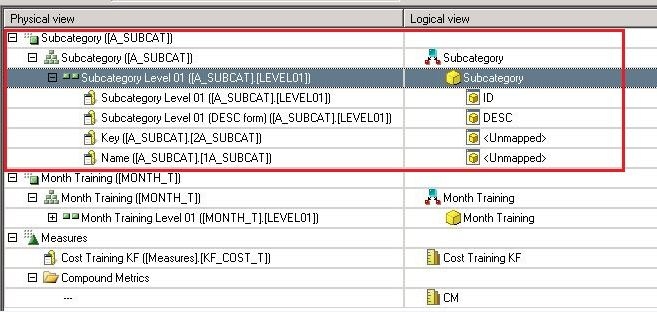


  • In MDX Cube Catalog, map the MDX Cube attribute to Subcategory attribute in Tutorial project.
     
ka04W000000OhTcQAK_0EM440000002CW2.jpeg
  • Create an element prompt called 'Choose Subcategory' against the MDX Cube attribute Subcategory.
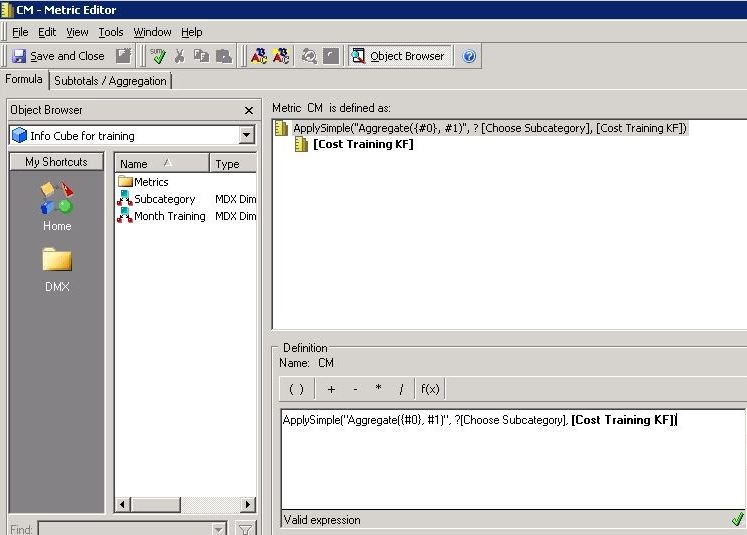
  • In MDX Cube Catalog, create a Compound metric called 'CM' using following expression where 'Choose Subcategory' is the element prompt in step 2 and 'Cost Training KF' is a MDX metric.


    ApplySimple("Aggregate({#0}, #1)", ?, )


ka04W000000OhTcQAK_0EM440000002CW4.jpeg
  • Create MDX Cube report with Subcategory, Cost Training KF and CM.
  • Run MDX Cube report.
     
ka04W000000OhTcQAK_0EM440000002CW3.jpeg
  •  
     
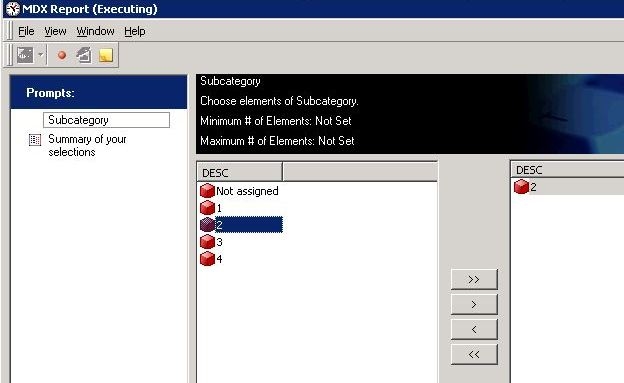
    Elements in the prompt are coming from MDX cube. After answering the prompt, the report returns data for the compound metric successfully.
     
ka04W000000OhTcQAK_0EM440000002CVx.jpeg
  • Create multi-source report (normal grid report) with Subcategory, Cost Training KF and CM. 
  • Run multi-source report.
      
    Notice that the elements displaying in the prompt actually come from the tutorial warehouse rather than MDX Cube, which is as expected.
     
ka04W000000OhTcQAK_0EM440000002CVu.jpeg
  •  
    But after finish the prompt, error occurs.
     

CAUSE:
 
This is a known enhancement request in Strategy 9.x-10.x
 
ACTION:
 
Contact Strategy Technical Support for updates of the issue.


Comment

0 comments

Details

Knowledge Article

Published:

May 18, 2017

Last Updated:

May 18, 2017