EducationSoftwareStrategy.com
StrategyCommunity

Knowledge Base

Product

Community

Knowledge Base

TopicsBrowse ArticlesDeveloper Zone

Product

Download SoftwareProduct DocumentationSecurity Hub

Education

Tutorial VideosSolution GalleryEducation courses

Community

GuidelinesGrandmastersEvents
x_social-icon_white.svglinkedin_social-icon_white.svg
Strategy logoCommunity

© Strategy Inc. All Rights Reserved.

LegalTerms of UsePrivacy Policy
  1. Home
  2. Topics

KB45800: "Maximum number of result rows retrieved per report was exceeded" error message appears when running incremental refresh report in MicroStrategy Developer 2021


Stefan Zepeda

Salesforce Solutions Architect • Strategy


This article helps to solve an issue that may occur when running Incremental Refresh Report in MicroStrategy Developer

SYMPTOM:
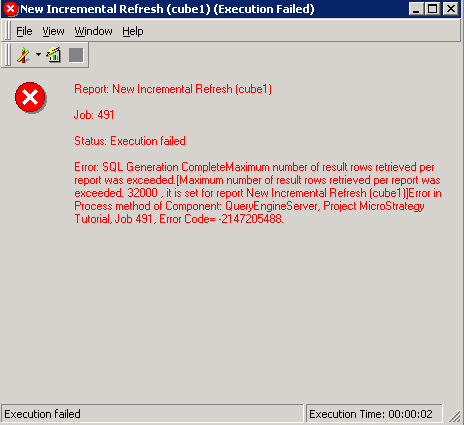
"Maximum number of result rows retrieved per report was exceeded" error message appears when running Incremental Refresh Report in Strategy Developer 2021 as below:
ka0PW0000000zjRYAQ_0EM4400000029Tt.png


Error: SQL Generation Complete Maximum number of result rows retrieved per report was exceeded. Error in Process method of Component: QueryEngineSever, Project Strategy Tutorial, Job 491, Error Code=-2147205488.
 
  
CAUSE:
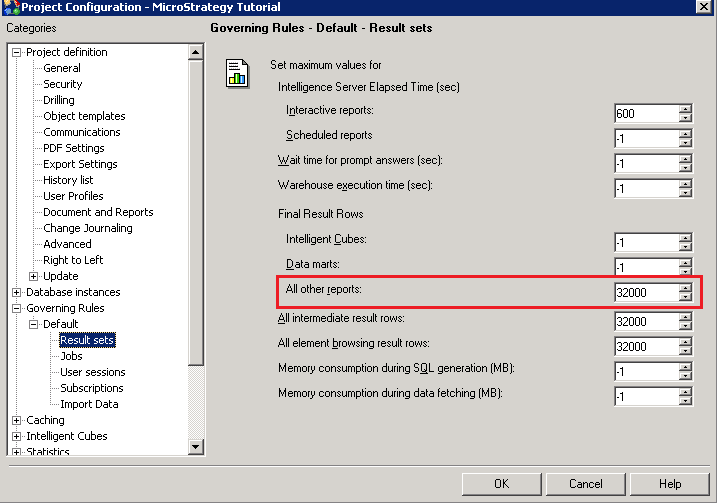
The result row limit for Incremental Refresh Report which is categorized under "All other reports" has been exceeded.
 
ACTION:
Follow one of below actions to address the problem:
1. Go to Project Configuration>Governing Rules>Default>Result Sets, and increase the Final Result Rows for "All other reports" as below:

ka0PW0000000zjRYAQ_0EM4400000029Tw.png

 
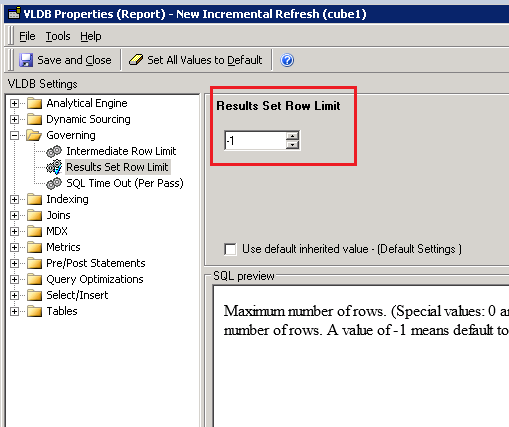
2. Go to Design View of the Incremental Refresh Report>Data>VLDB Properties, and set the proper value for the Results Set Row Limit under Governing as below:
ka0PW0000000zjRYAQ_0EM4400000029Tv.png


Comment

0 comments

Details

Knowledge Article

Published:

May 30, 2017

Last Updated:

February 27, 2024