Sometimes, while working with prompted reports, users may find that the way Strategy is creating and using a cache is erroneous.
Think of the following situation:
A report that has an Item prompt is run by selecting 10 Items, (A,B,C,D,E,F,G,H,I,J). A report cache containing that set of data is created.
The next time the report is executed only a subset of 5 Items, (A,B,C,D,E), is selected in the prompt.
Why is not the 5 Items execution using the cache created by the previous 10 Items execution? Why does it create a new cache?
This behavior, that would perfectly explain an Intelligent Cube purpose in a smaller scale, occurs by design, and can be explained by the Report Caching flow:
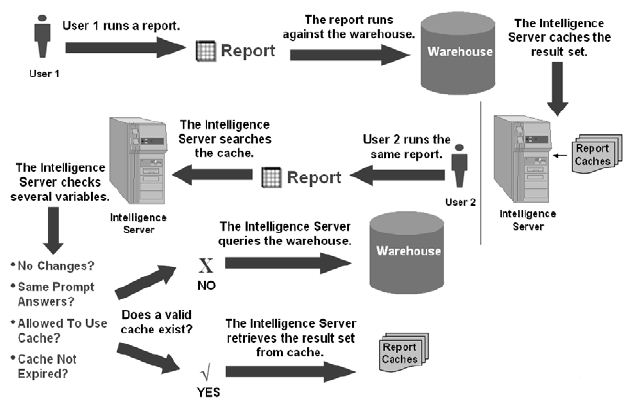
• Are the report and any objects it contains unchanged since the cache was created?
• For prompted reports, did the second user choose the same prompt answers as the first user?
• Based on cache property and security settings, is the second user allowed to access the first user’s cache?
• Is the cache still active (that is, it is not expired)?
6. If the answer to any of these variables is No, the cache is not valid, and the Intelligence Server queries the data warehouse.
7. If the answer to all of these variables is Yes, the cache is valid, and the Intelligence Server retrieves the result set from the cache.
In the situation described above, the prompt answers are not the same and therefore the cache is not valid. A second cache is created.
In Strategy the prompt answers have to be identically the same but the order in which they are answered can be different. Find an explanation in KB15398.
To learn more:
See the chapter In-memory Caching from the Strategy Administration - Configuration and Security PDF
