EducationSoftwareStrategy.com
StrategyCommunity

Knowledge Base

Product

Community

Knowledge Base

TopicsBrowse ArticlesDeveloper Zone

Product

Download SoftwareProduct DocumentationSecurity Hub

Education

Tutorial VideosSolution GalleryEducation courses

Community

GuidelinesGrandmastersEvents
x_social-icon_white.svglinkedin_social-icon_white.svg
Strategy logoCommunity

© Strategy Inc. All Rights Reserved.

LegalTerms of UsePrivacy Policy
  1. Home
  2. Topics

KB45815: New Feature in Visual Insight MicroStrategy Web 9.4.0: Ability to Minimize, Maximize, Hide and Reposition legends in Graph Visualizations


Community Admin

• Strategy


MicroStrategy Web 9.4.0 and later users are now able to minimize, maximize, hide and reposition legends in graph visualizations in Visual Insight. 

SUMMARY:
Strategy Web 9.4.0 and later users are now able to minimize, maximize, hide and reposition legends in graph visualizations in Visual Insight. 
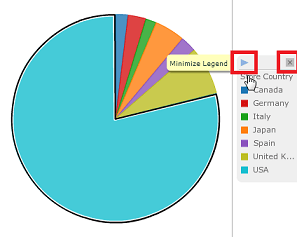
Minimize and Maximize can be accessed by clicking on the new arrow displayed in the graph legend box as shown below:
ka04W000000OdoTQAS_0EM4400000026Lt.png

Additionally the close button will now hide the legend from the visualization.
To re-position a graph legend, drag the legend box to the predefined positions as shown below:

ka04W000000OdoTQAS_0EM4400000026MN.png

 
WORKAROUND FOR PREVIOUS VERSIONS:
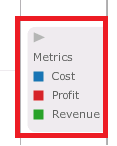
Visual Insight users in Strategy Web 9.3.0 and 9.3.1 have access to the maximize and minimize feature when using a graph matrix visualization as shown below:
ka04W000000OdoTQAS_0EM4400000026MO.png

However, users will not be able to re-position or hide legends. The available graph matrices are : Bar Graph Matrix, Line Graph Matrix, Bubble Graph Matrix and Scatter Graph Matrix.


Comment

0 comments

Details

Knowledge Article

Published:

June 15, 2017

Last Updated:

June 15, 2017