EducationSoftwareStrategy.com
StrategyCommunity

Knowledge Base

Product

Community

Knowledge Base

TopicsBrowse ArticlesDeveloper Zone

Product

Download SoftwareProduct DocumentationSecurity Hub

Education

Tutorial VideosSolution GalleryEducation courses

Community

GuidelinesGrandmastersEvents
x_social-icon_white.svglinkedin_social-icon_white.svg
Strategy logoCommunity

© Strategy Inc. All Rights Reserved.

LegalTerms of UsePrivacy Policy
  1. Home
  2. Topics

KB45851: When using a macro in the "File Name" bursting option to control the file name of a file subscription of a Freeform SQL report, the attribute is omitted from the file name in MicroStrategy 9.x


Community Admin

• Strategy


SYMPTOM:
 
When using a macro in the "File Name" bursting option to control the file name of a file subscription of a Freeform SQL report, the attribute is omitted from the file name in Strategy 9.x.
 
STEPS TO REPRODUCE:
 
1.     Create a Free Form SQL report in Strategy Desktop or Strategy Developer.
2.     Log in to Strategy Web and create a new file subscription for the report created in the previous step.
3.     Set the page-by attribute as the file name as shown below.
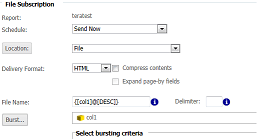
ka04W000000Oh0cQAC_0EM4400000029TV.png

 
4.     The resulting file will not have the name of the attribute in the file name. 
 
 
CAUSE:
 
This is a known issue in Strategy 9.x.
 
 
ACTION:
 
This issue has been addressed in Strategy 10.x. Users can upgrade to Strategy 10.x to take advantage of this fix.


Comment

0 comments

Details

Knowledge Article

Published:

June 6, 2017

Last Updated:

June 6, 2017