EducationSoftwareStrategy.com
StrategyCommunity

Knowledge Base

Product

Community

Knowledge Base

TopicsBrowse ArticlesDeveloper Zone

Product

Download SoftwareProduct DocumentationSecurity Hub

Education

Tutorial VideosSolution GalleryEducation courses

Community

GuidelinesGrandmastersEvents
x_social-icon_white.svglinkedin_social-icon_white.svg
Strategy logoCommunity

© Strategy Inc. All Rights Reserved.

LegalTerms of UsePrivacy Policy
  1. Home
  2. Topics

KB45858: Error "Unable to access the selected application" when deploying MicroStrategy or MicroStrategyMobile war files to Weblogic 12c


Community Admin

• Strategy


Error "Unable to access the selected application" when deploying MicroStrategy or MicroStrategyMobile war files to Weblogic 12c

SYMPTOM:
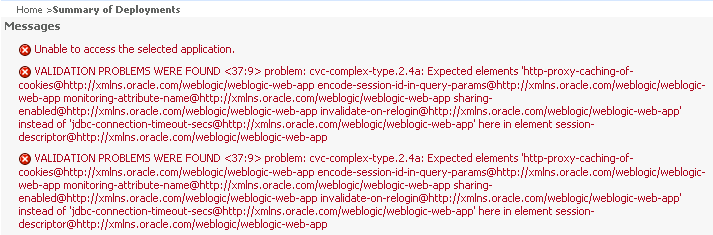
When deploying Strategy Analytics Enterprise 9.4.1 version or older Strategy.war or StrategyMobile.war to Oracle Weblogic 12c, following error occurs.
 

ka04W000000ObvYQAS_0EM4400000026Li.png


Unable to access the selected application.


VALIDATION PROBLEMS WERE FOUND <37:9> problem: cvc-complex-type.2.4a: Expected elements 'http-proxy-caching-of-cookies@http://xmlns.oracle.com/weblogic/weblogic-web-app encode-session-id-in-query-params@http://xmlns.oracle.com/weblogic/weblogic-web-app monitoring-attribute-name@http://xmlns.oracle.com/weblogic/weblogic-web-app sharing-enabled@http://xmlns.oracle.com/weblogic/weblogic-web-app invalidate-on-relogin@http://xmlns.oracle.com/weblogic/weblogic-web-app' instead of 'jdbc-connection-timeout-secs@http://xmlns.oracle.com/weblogic/weblogic-web-app' here in element session-descriptor@http://xmlns.oracle.com/weblogic/weblogic-web-app

 
CAUSE:
This is known issue in Strategy Web and Strategy Mobile 9.4.1 or older.
Oracle has stopped supporting for element "jdbc-connection-timeout-secs", which still exists in Strategy 9.4.1 or older.
Please refer to oracle for more information: http://docs.oracle.com/middleware/1212/wls/WLSRN/issues.htm#WLSRN001
 
ACTION:
This issue has been addressed in Strategy Analytics Enterprise 9.4.1 HF5. Take advantage of upgrading for a fix.
For versions before Strategy Analytics Enterprise 9.4.1 HF5, use Oracle Weblogic 12c below versions .
 
WORKAROUND:
Manually remove following content in Strategy(Mobile)/WEB-INF/weblogic.xml before deploy to Oracle Weblogic 12c:
 

      <session-param>


      <param-name>JDBCConnectionTimeoutSecs</param-name>


      <param-value>120</param-value>


      </session-param>


Comment

0 comments

Details

Knowledge Article

Published:

June 1, 2017

Last Updated:

June 1, 2017