EducationSoftwareStrategy.com
StrategyCommunity

Knowledge Base

Product

Community

Knowledge Base

TopicsBrowse ArticlesDeveloper Zone

Product

Download SoftwareProduct DocumentationSecurity Hub

Education

Tutorial VideosSolution GalleryEducation courses

Community

GuidelinesGrandmastersEvents
x_social-icon_white.svglinkedin_social-icon_white.svg
Strategy logoCommunity

© Strategy Inc. All Rights Reserved.

LegalTerms of UsePrivacy Policy
  1. Home
  2. Topics

KB45865: No Personal View is added after clicking the link defined in a prompted document with MicroStrategy Web 9.3.1


Community Admin

• Strategy


No Personal View is added after clicking the link defined in a prompted document with MicroStrategy Web 9.3.1

This issue is classified as a design issue. The issue is limited to prompted documents with a link defined for Personal View option. Resolution is provided.
Personal View does not get updated in My Subscriptions page even after the link is clicked. No error message appears.
 
STEPS TO REPRODUCE:
  • Create a report with an attribute element prompt.
  • Create a document with the report.
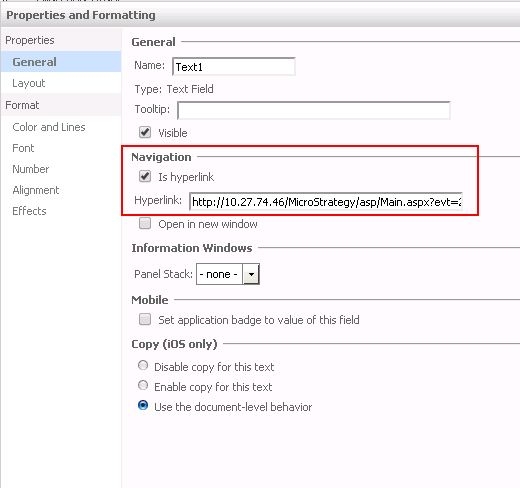
  • Add a text box and open "Properties."
  • Select General > Navigation, then, check "Is hyperlink" checkbox.
ka04W000000ObtOQAS_0EM4400000026ER.jpeg
  • Add the link defined for Personal View. For example,
     
    http://:/MicroStrategy/servlet/mstrWeb?evt=2048001&src=mstrWeb.2048001&visMode=0¤tViewMedia=2&documentID=&server=&Project=&port=&evt=256022&src=mstrWeb.rwd.pvsubs.pvsubs_sb.256022&subName=&objectID=&objectType=55&evt=256021&src=mstrWeb.rwd.pvsubs.pvsubs_sb.256021&2048001=1&256022=1&256021=1&evtorder=256022,256021,2048001
  • Save and execute the document.
  • Click the link and notice that the prompt page appears.
  • Answer the prompt.
  • Check "My Subscriptions" and notice that "Personal View" is not added.

 
CAUSE:
This is working as designed. Different syntax is required for the prompted document and the one for non-prompted document does not work. 
 
ACTION:
Follow the suggestion for prompted document as explained in:

  • KB44311 - How to Save a Personal View Using the Strategy Web URL API 9.3.1

For prompted reports, consider following workarounds:
 
WORKAROUND 1:
Use "Create Personal View" from the menu.
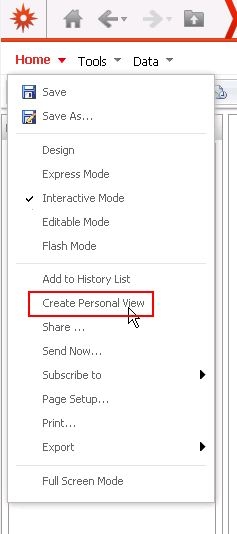
 

ka04W000000ObtOQAS_0EM4400000026EM.jpeg


WORKAROUND 2:
Save the document as static and execute the document.
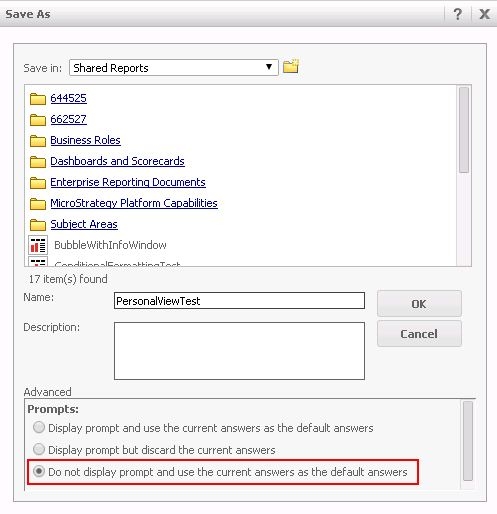
ka04W000000ObtOQAS_0EM4400000026ES.jpeg


KB02577


Comment

0 comments

Details

Knowledge Article

Published:

June 5, 2017

Last Updated:

October 1, 2018