EducationSoftwareStrategy.com
StrategyCommunity

Knowledge Base

Product

Community

Knowledge Base

TopicsBrowse ArticlesDeveloper Zone

Product

Download SoftwareProduct DocumentationSecurity Hub

Education

Tutorial VideosSolution GalleryEducation courses

Community

GuidelinesGrandmastersEvents
x_social-icon_white.svglinkedin_social-icon_white.svg
Strategy logoCommunity

© Strategy Inc. All Rights Reserved.

LegalTerms of UsePrivacy Policy
  1. Home
  2. Topics

KB45869: "No available tables were found in the warehouse catalog" warning message is returned when opening the Warehouse Catalog in MicroStrategy 9.4.x-10.x.


Community Admin

• Strategy


This knowledge base article documents why "No available tables were found in the warehouse catalog" warning message is returned when opening the Warehouse Catalog in MicroStrategy 9.4.x-10.x.

SYMPTOM:
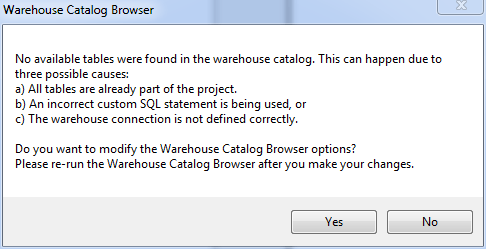
After creating a new database instance pointing to an Oracle database and opening Warehouse Catalog with that database instance in Strategy Developer 9.4.x-10.x, users may encounter the following error:
ka04W000000OhapQAC_0EM440000002CUr.png


No available tables were found in the warehouse catalog. This can happen due to three possible causes:
a) All tables are already part of the project)
b) An incorrect custom SQL statement is being used, or
c) The warehouse connection is not defined correctly.
Do you want to modify the Warehouse Catalog Browser options?
Please re-run the Warehouse Catalog Browser after you make your changes.

 
CAUSE:
This warning message can appear for any of the three scenarios listed above:

  1. All tables are already part of the project. This implies that every table that exists in the warehouse has already been added to the "Tables being used in the project" pane on the right.
  2. An incorrect custom SQL statement is being used. This implies that the table read settings are not returning any results from your warehouse.
  3. The warehouse connection is not defined properly. This implies the current settings within the database instance are incorrectly defined.

ACTION:
Cause 1:
The first cause requires no troubleshooting, as this warning is automatically displayed after adding all tables to the project and reopening Warehouse Catalog.
 
Cause 2:
To troubleshoot the second cause, test the following.
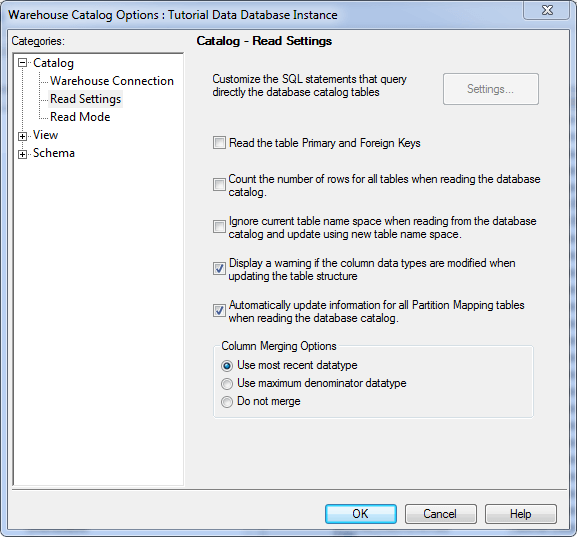
  • If the warning message is still open, click Yes. Otherwise, in the main window of Warehouse Catalog, hit the "Options..." button in the toolbar.
  • Under Catalog > Read Settings, hit the "Settings..." button.
ka04W000000OhapQAC_0EM440000002CUp.png

 
Note: if the button is greyed out as shown above, the database instance selected uses ODBC calls to return tables and columns in Warehouse Catalog, so the warning is due to either the first or third cause.

  • Take the table read SQL in the upper window and run it in Strategy DB Query Tool. If the SQL includes a parameter with hashes (e.g., '#LOGIN_NAME#'), replace it with the login name used as part of the custom database login defined in Warehouse Catalog or the database login defined in the database instance.
  • If no rows are returned, consult with the database administrator for the warehouse as to why no tables were returned. If rows were returned, there may be an issue with the database connection.

In some instances, users report this issue when using the default table read SQL with their current database login. Below is the default table read SQL for Oracle databases:


SELECT DISTINCT OWNER NAME_SPACE, TABLE_NAME TAB_NAME 
FROM ALL_TABLES 
WHERE OWNER = '#LOGIN_NAME#' AND DROPPED = 'NO' 
UNION SELECT DISTINCT OWNER NAME_SPACE, VIEW_NAME TAB_NAME 
FROM ALL_VIEWS 
WHERE OWNER = '#LOGIN_NAME#

 
To work around this, users can do one of the following: 

  • Speak to their database administrator about the proper login name to use as a custom database login.  This login name can be manually inserted removing the '#LOGIN_NAME#' parameter in the table read SQL.
  • Remove the OWNER = '#LOGIN_NAME#' parameters from the table read SQL. This will display all tables for all owners within the database. The SQL should display as follows:


SELECT DISTINCT OWNER NAME_SPACE, TABLE_NAME TAB_NAME 
FROM ALL_TABLES 
WHERE DROPPED = 'NO' 
UNION SELECT DISTINCT OWNER NAME_SPACE, VIEW_NAME TAB_NAME 
FROM ALL_VIEWS

 
Cause 3:
In the event you have determined this warning is not thrown due to either cause 1 or cause 2, check the following:

  1. Make sure you are using the correct database connection type for your warehouse.
  2. Make sure the database connection points to the correct DSN in the list of "Local system ODBC data sources"
  3. Make sure you are using the correct username and password to access the database.
  4. Speak to your DBA about the correct advanced settings that should be set for the database connection. 

Comment

0 comments

Details

Knowledge Article

Published:

May 11, 2017

Last Updated:

May 11, 2017